
What are the different types of firewalls and how do they work in network security?
Firewalls are essential cybersecurity tools that act as barriers between trusted and untrusted networks. There are several types of firewalls, each with unique functionalities—from packet filtering to deep packet inspection, and cloud-based filtering. Understanding the various types like Packet-Filtering Firewalls, Stateful Inspection Firewalls, Proxy Firewalls, Next-Gen Firewalls, Software, Hardware, and Cloud Firewalls helps organizations choose the best protection method based on their security needs and infrastructure design.
Quick answer: A firewall monitors and controls network traffic using security rules. Main types include packet-filtering, stateful inspection, proxy, next-generation and web application firewalls, each working at a different depth. Simple filters check addresses and ports, while advanced types inspect sessions, applications and content for threats.
Key takeaways
- Packet filters check addresses and ports, while stateful firewalls track whole connections.
- Proxy and next-generation firewalls inspect application content, and a WAF protects web apps specifically.
- Pick the type by where it sits and what it must inspect, not by the brand.
Table of Contents
- What Is a Firewall in Cybersecurity?
- Why Are Firewalls Important?
- 8 Major Types of Firewalls Explained
- Comparison Table: Types of Firewalls
- Which Firewall Is Right for You?
- Conclusion
Firewalls matter for protecting organizations and individuals from cyber threats. Whether you're running a data center, managing a business network, or just using the internet at home, firewalls serve as the first line of defense. But did you know there are several different types of firewalls, and each serves a unique purpose?
In this blog, we’ll break down the most important types of firewalls, how they work, their strengths, and when to use each. This guide is ideal for IT professionals, cybersecurity students, or anyone trying to secure their network.
What Is a Firewall in Cybersecurity?
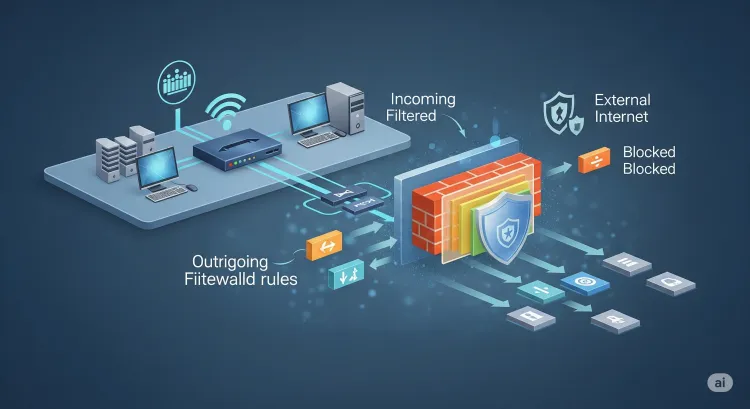
A firewall is a network security system that monitors and controls incoming and outgoing traffic based on predefined security rules. It acts as a barrier between a trusted internal network and untrusted external networks (like the internet), blocking malicious data packets and unauthorized access.
Why Are Firewalls Important?
-
Prevent unauthorized access to sensitive data
-
Control traffic flow and user behavior
-
Detect and block malicious threats
-
Protect internal systems from external attacks
-
Maintain compliance with data protection regulations
8 Major Types of Firewalls Explained
The firewall landscape has evolved significantly over the years. Here’s a deep look at the major types of firewalls used in cybersecurity today:
1. Packet-Filtering Firewalls
Function: Filters data packets based on predefined rules like IP addresses, ports, and protocols.
How It Works: At the network layer, the firewall checks the packet header information without analyzing the payload. It allows or blocks traffic based on ACLs (Access Control Lists).
Use Case: Simple and fast filtering at the router level; ideal for basic network protection.
Limitation: Cannot inspect packet content or state, vulnerable to spoofing and certain attacks.
2. Circuit-Level Gateways
Function: Validates TCP handshakes without examining the actual data being transmitted.
How It Works: Operates at the session layer. Once the connection is verified, it assumes that the traffic is safe and allows it.
Use Case: Lightweight solution for session validation; useful when minimal resource usage is desired.
Limitation: Doesn’t inspect the payload, so it may allow malicious data through after session initiation.
3. Stateful Inspection Firewalls (Dynamic Packet Filtering)
Function: Tracks the state of active connections and uses context to evaluate packet legitimacy.
How It Works: Maintains a state table to track every connection. It inspects both the header and part of the payload for ongoing traffic.
Use Case: Widely used in enterprise networks for enhanced traffic inspection.
Limitation: More resource-intensive than packet-filtering firewalls.
4. Proxy Firewalls (Application-Level Gateways)
Function: Acts as an intermediary between users and services, masking internal identities.
How It Works: Intercepts requests and fetches data on behalf of the user. It can filter traffic based on application-level rules (like HTTP, FTP).
Use Case: Great for anonymous browsing and enforcing strong content filtering.
Limitation: Can slow down performance due to deep inspection.
5. Next-Generation Firewalls (NGFW)
Function: Combines traditional firewall capabilities with deep packet inspection, intrusion prevention, and threat intelligence.
How It Works: Operates across multiple layers (from transport to application) using advanced algorithms and AI to detect malicious behavior.
Use Case: Essential for enterprises and SOCs that require threat prevention.
Limitation: High cost and complexity in setup and management.
6. Software Firewalls
Function: Installed on individual endpoints (PCs, servers) to filter traffic as per software-based rules.
How It Works: Runs on operating systems and blocks traffic based on policies defined by the user or admin.
Use Case: Ideal for personal devices and internal segmentation within organizations.
Limitation: May consume system resources and is only effective per device.
7. Hardware Firewalls
Function: Standalone physical appliances that protect entire networks at the perimeter.
How It Works: Usually placed between the router and the internet. These devices block or allow traffic based on internal firmware rules and configurations.
Use Case: Suitable for enterprises and large networks that need perimeter-based defense.
Limitation: Expensive and requires professional installation.
8. Cloud Firewalls (Firewall-as-a-Service)
Function: Hosted in the cloud and designed to protect distributed networks and applications.
How It Works: Filters traffic across multiple environments (on-premise, cloud, hybrid) without relying on physical infrastructure.
Use Case: Ideal for cloud-native apps, remote workers, and SaaS environments.
Limitation: Internet-dependent; performance may vary with latency.
Comparison Table: Types of Firewalls
| Firewall Type | Level of Operation | Key Feature | Best Use Case |
|---|---|---|---|
| Packet-Filtering | Network Layer | Fast, basic filtering based on IP/port | Routers, small networks |
| Circuit-Level Gateway | Session Layer | Validates TCP handshakes | Low-resource environments |
| Stateful Inspection | Transport Layer | Context-aware, tracks active connections | Corporate networks |
| Proxy Firewall | Application Layer | Anonymity and content control | Browsing control, app filtering |
| Next-Gen Firewall (NGFW) | Multi-layer | Threat detection + AI-powered inspection | Enterprise security |
| Software Firewall | Host-level | Custom policies for each device | Personal computers, internal segments |
| Hardware Firewall | Perimeter-level | Protects whole networks via physical appliances | Large enterprise networks |
| Cloud Firewall | Cloud-level | Scalable protection across cloud environments | SaaS, cloud-native companies |
Which Firewall Is Right for You?
Choosing the right firewall depends on:
-
Size of your organization
-
Type of applications you run
-
Level of threat exposure
-
Budget and IT resources
For basic home use, a software firewall is sufficient. Enterprises often opt for NGFWs or hardware firewalls, while cloud-first organizations may go with cloud firewalls.
Conclusion
Firewalls are essential to network security, and understanding their types helps in implementing a defense-in-depth strategy. From packet-filtering firewalls to advanced next-gen systems, each firewall serves a unique role in protecting data, devices, and users from cyber threats.
Implementing the right firewall setup can prevent everything from malware to ransomware, phishing, and even zero-day exploits. Stay proactive, because in cybersecurity, prevention is always better than cure.
To take this further with guided labs and an instructor, see our Cisco security core training.
Related reading
Frequently Asked Questions
What's Your Reaction?
 Like
0
Like
0
 Dislike
0
Dislike
0
 Love
0
Love
0
 Funny
0
Funny
0
 Wow
0
Wow
0
 Sad
0
Sad
0
 Angry
0
Angry
0

Vaishnavi is a skilled tech professional at the Ethical Hacking Training Institute in Pune, responsible for managing and optimizing the technical infrastructure that supports advanced cybersecurity education. With deep expertise in network security, backend operations, and system performance, she ensures that practical labs, online modules, and assessments run smoothly and securely. Her behind-the-scenes contributions play a vital role in delivering a seamless and secure learning experience for aspiring ethical hackers.






![Top 10 Famous Ethical Hackers in India [Updated 2026]](https://www.webasha.com/blog/uploads/images/202608/image_140x98_da23f65c290cfbf1237d77aec58a2f0f.jpg)



