BlackEye Phishing Tool: Features, Installation, and Best Practices
BlackEye is an open-source phishing simulation tool widely used in ethical hacking and cybersecurity training. It helps simulate phishing attacks by hosting realistic phishing pages for platforms like Facebook, Instagram, and Google. By leveraging tunneling services like Ngrok, BlackEye exposes these pages online and captures entered credentials in real time. This tool is intended for ethical purposes, such as training and awareness campaigns, and must always be used with proper authorization.
In modern ethical hacking and penetration testing, phishing simulation tools remain one of the fastest ways to measure how well users recognize social-engineering attacks and how resilient an organization really is. Among the tools still widely taught in 2026, BlackEye stands out — an open-source phishing framework valued for how quickly it can spin up convincing phishing pages with almost no setup.
This guide is a complete, up-to-date walkthrough of BlackEye, covering its features, installation, day-to-day usage, and the best practices that keep your testing lawful. It is written strictly for educational purposes and is meant for authorized use inside a controlled lab or an engagement where you have written permission.
What is BlackEye?
BlackEye is a phishing-simulation tool that generates pages closely mimicking popular websites and platforms. Security teams lean on it for cybersecurity training, awareness campaigns, and penetration testing: it hosts a phishing page, hands you a publicly reachable link, and lets you observe — safely and with consent — how people react to a realistic phishing attempt.
Warning: Unauthorized use of BlackEye for malicious purposes is illegal and punishable under cybersecurity laws. Always obtain consent before conducting tests.
Key Features of BlackEye
-
Pre-configured Templates
BlackEye ships with ready-made phishing templates for major platforms including Facebook, Instagram, Twitter, Google, and LinkedIn. -
Tunneling Services
It integrates with tunneling services such as Ngrok, Cloudflared, and LocalhostRun to publish phishing pages on publicly accessible URLs. -
Real-Time Credential Capture
Any credentials entered on a phishing page are captured and printed to the terminal the moment they are submitted. -
Cross-Platform Compatibility
It runs on most Linux distributions, including Kali Linux, Ubuntu, and Parrot OS. -
Customizable and Extendable
You can edit the bundled templates or add your own to target additional platforms as an engagement requires.
Why Use BlackEye for Ethical Hacking?
-
Phishing Awareness
It reproduces real-world phishing scenarios so users learn to spot the warning signs before an attacker uses them. -
Security Assessments
It shows exactly how your people and systems respond to malicious links and credential-theft attempts. -
Training and Development
It gives security professionals a hands-on view of attacker tactics, which makes designing countermeasures far more effective. -
Easy to Use
BlackEye’s straightforward, menu-driven interface keeps it approachable even for newcomers to cybersecurity.
How to Install BlackEye
Follow these steps to install and set up BlackEye on a Linux system.
Step 1: Update Your System
Ensure your system is updated to avoid compatibility issues:
sudo apt update && sudo apt upgrade -y
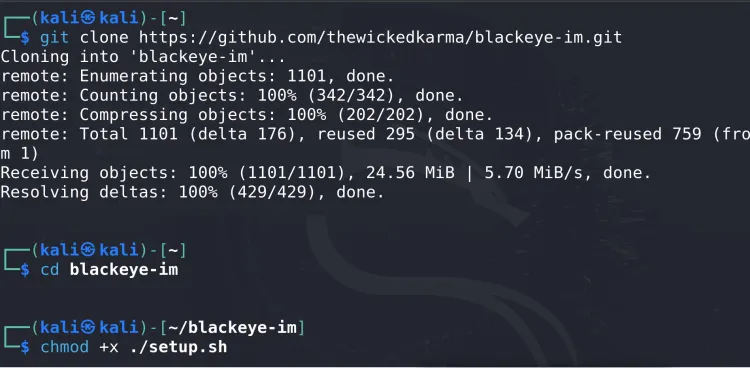
Step 2: Clone the BlackEye Repository
Download BlackEye from its official GitHub repository:
git clone https://github.com/thewickedkarma/blackeye-im.git
Step 3: Navigate to the BlackEye Directory
Move into the directory where BlackEye has been downloaded:
cd blackeye-im
Step 4: Grant Execute Permissions
Ensure the script has execute permissions:
chmod +xblackeye.sh
Step 5: Install Dependencies
Install required tools like PHP, curl, and unzip:
sudo apt install curl php unzip -y
Step 6: Run the Script
Launch BlackEye with the following command:
./blackeye.sh
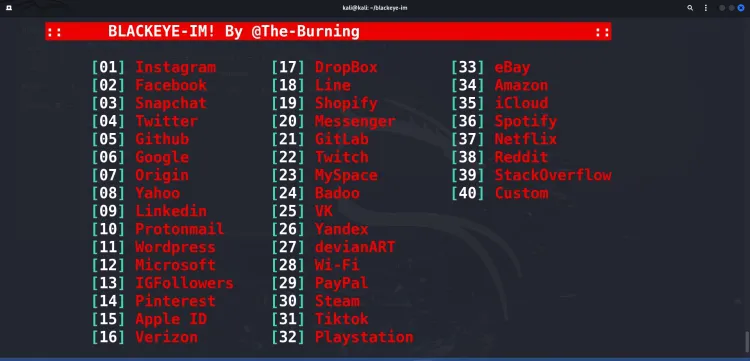
This starts the tool and displays a menu of phishing templates and options.
How to Use BlackEye
Once installed, follow these steps to simulate a phishing attack ethically:
Step 1: Select a Platform
Choose a platform from the menu (e.g., Facebook, Instagram, Twitter). Each platform is mapped to a number.
To create a phishing page for Instagram, for example, type its assigned number and press Enter.
Step 2: Choose a Tunneling Service
BlackEye relies on tunneling services to expose phishing pages to the internet. The usual options are Ngrok and Cloudflared:
- If Ngrok is installed, BlackEye uses it.
- If not, BlackEye will download and configure it automatically.
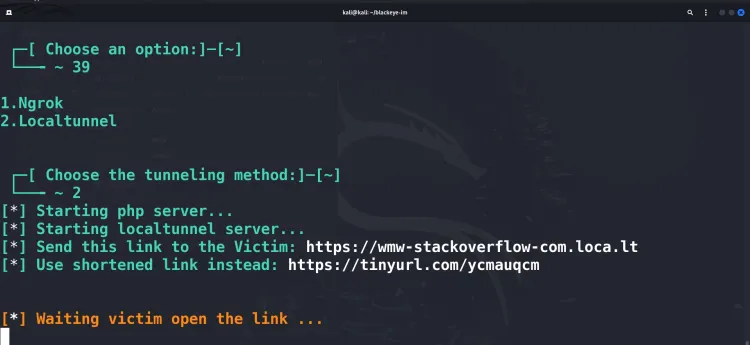
Step 3: Share the Generated Link
BlackEye generates a public URL. Share this link only with test subjects who have given their consent.
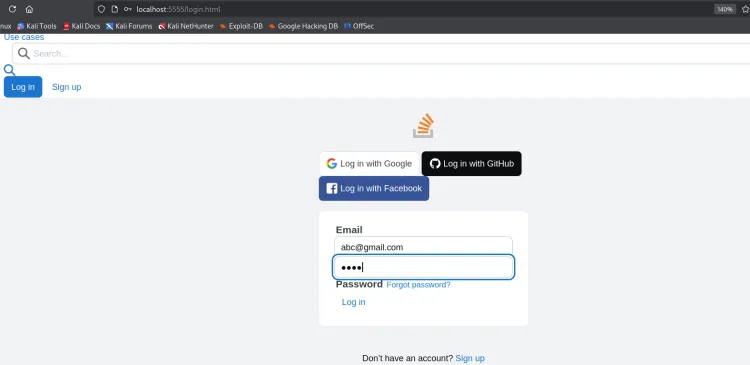
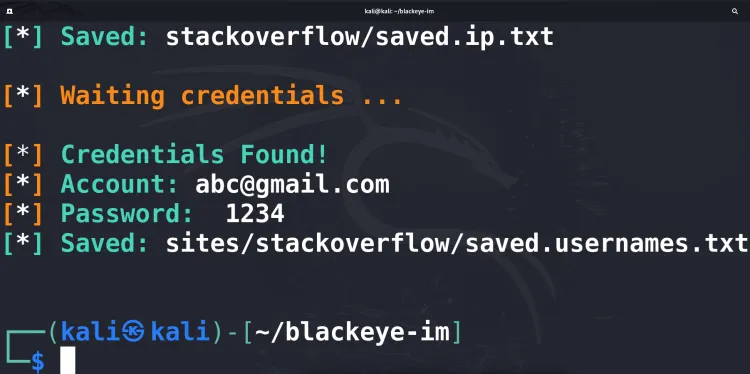
Step 4: Monitor the Results
BlackEye captures credentials entered on the phishing page and displays them in real time in the terminal.
For example:
[+] Username: testuser
[+] Password: testpassword123 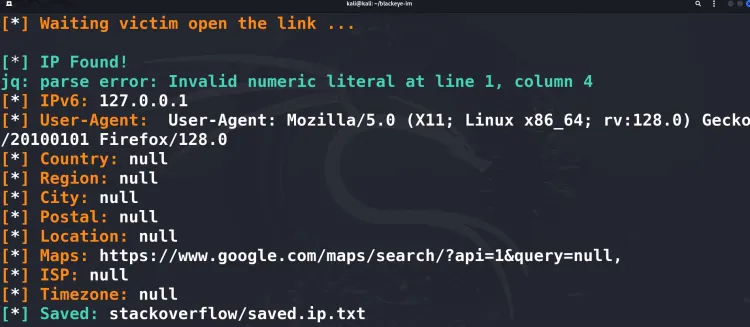
Best Practices for Using BlackEye
-
Obtain Explicit Permission
Always secure written authorization before running any phishing simulation. -
Use Custom Templates
Tailor templates so they closely match the target’s legitimate site, which makes the exercise more realistic and the findings more credible. -
Educate After Testing
Debrief participants afterward and walk them through the exact cues that would have exposed the phishing attempt. -
Avoid Overloading Systems
Keep test volumes reasonable so you never disrupt production systems or users. -
Integrate with Training Programs
Pair BlackEye simulations with structured awareness sessions to turn results into lasting behavior change.
Common Issues and Solutions
-
Error:
Permission Denied
Ensure execute permissions using:chmod +xblackeye.sh -
Ngrok Not Working
Verify Ngrok is installed and properly configured. Reinstall if necessary. -
Script Fails to Run
Check for missing dependencies (PHP, curl, unzip) and reinstall using:sudo apt install curl php unzip -y
Conclusion
BlackEye remains a practical, beginner-friendly way for ethical hackers to simulate phishing campaigns and raise real security awareness. Because it can stand up believable phishing pages and capture credentials in real time, it continues to earn its place in a penetration tester’s toolkit in 2026 — but only when it is used ethically and with permission, never against anyone who has not agreed to be tested.
Work through this guide and you will be able to install and run BlackEye confidently to assess and strengthen an organization’s security posture. Phishing awareness is still one of the highest-impact areas of modern defense, and hands-on tools like BlackEye are exactly what turn abstract warnings into resilient systems and well-trained users.
Disclaimer: This blog is for educational purposes only. Misuse of BlackEye is illegal and unethical. Always adhere to ethical hacking principles and cybersecurity laws.
FAQ:
What is BlackEye?
BlackEye is an open-source phishing tool designed to simulate phishing attacks by hosting phishing pages and capturing credentials for educational and ethical purposes.
Is BlackEye legal to use?
Yes, but only in controlled environments with explicit authorization. Unauthorized use is illegal and unethical.
Which platforms can BlackEye simulate?
BlackEye supports phishing page templates for platforms like Facebook, Instagram, Twitter, Google, LinkedIn, and more.
What are the prerequisites for running BlackEye?
You need a Linux-based operating system and dependencies like PHP, curl, and unzip installed.
Does BlackEye work on Windows?
BlackEye is primarily designed for Linux systems. It may require additional setup or compatibility layers to run on Windows.
What are tunneling services, and why are they used?
Tunneling services like Ngrok and Cloudflared expose local phishing pages to the internet, making them accessible via public URLs.
Can I add custom templates in BlackEye?
Yes, BlackEye allows you to modify or add custom phishing page templates to target additional platforms.
What precautions should I take while using BlackEye?
Always obtain consent, use it responsibly in a controlled environment, and educate users about phishing after simulations.
What should I do if BlackEye doesn’t run correctly?
Ensure dependencies like PHP and curl are installed. Also, check for permission issues and reassign execution permissions using chmod +x blackeye.sh.
What are the ethical applications of BlackEye?
BlackEye is used in cybersecurity training, phishing awareness programs, and penetration testing to improve security posture and educate users about phishing risks.
What's Your Reaction?
 Like
0
Like
0
 Dislike
0
Dislike
0
 Love
1
Love
1
 Funny
0
Funny
0
 Wow
0
Wow
0
 Sad
0
Sad
0
 Angry
0
Angry
0

Vaishnavi is a skilled tech professional at the Ethical Hacking Training Institute in Pune, responsible for managing and optimizing the technical infrastructure that supports advanced cybersecurity education. With deep expertise in network security, backend operations, and system performance, she ensures that practical labs, online modules, and assessments run smoothly and securely. Her behind-the-scenes contributions play a vital role in delivering a seamless and secure learning experience for aspiring ethical hackers.