Step by Step Ethical Hacking Learning Roadmap in India: Skills, Tools, Certifications and Career Path
A realistic stage-by-stage roadmap to learning ethical hacking in India - what order to learn networking, Linux, scripting and tools, what is legal under the IT Act, which certifications employers recognise, and how to turn study into a first job.
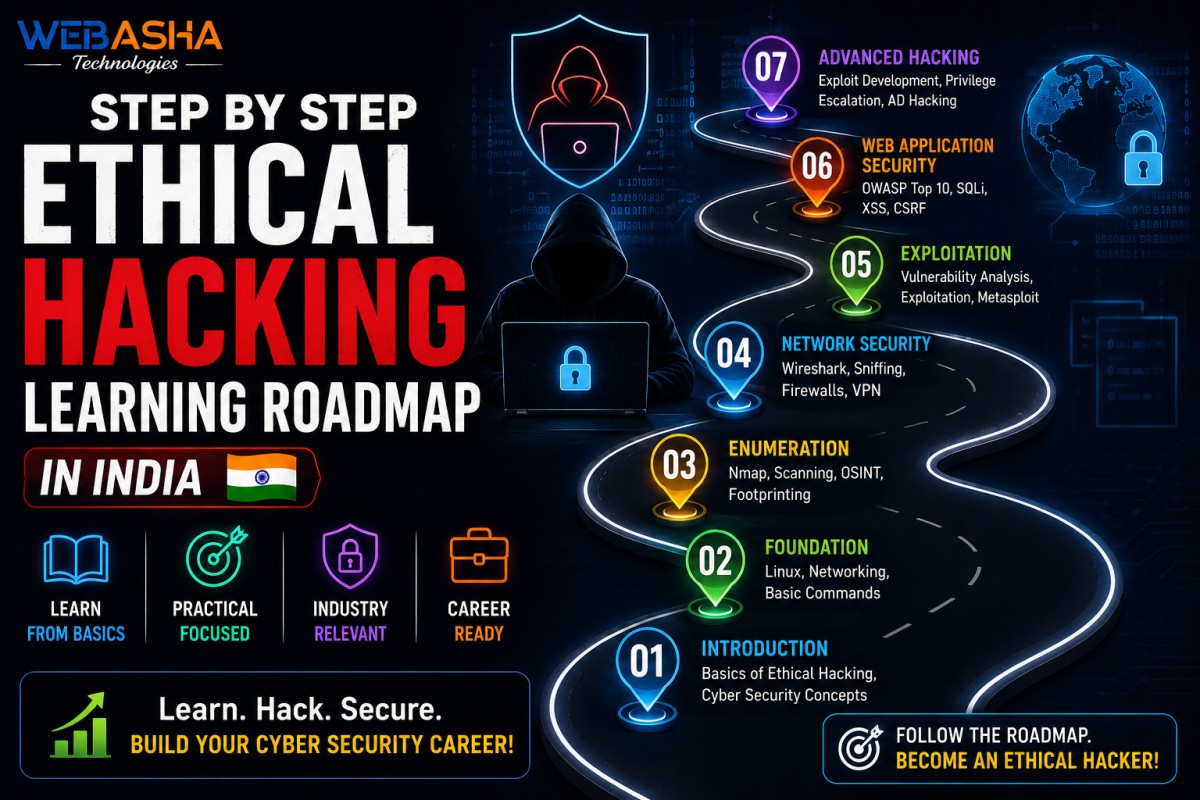
Most ethical hacking roadmaps are lists of tools with no sense of order, which is why so many people in India start with Kali Linux, learn twenty commands, and then stall. This guide sets out the sequence that actually works: networking before tools, Linux before exploitation, practice before certification. It covers what is legal in India and what is not, how long each stage realistically takes, which certifications Indian employers recognise, and how to turn study into a first job. It is written for people starting from zero as well as IT professionals switching across.
Topics covered in this guide: ethical hacking roadmap in India, how to become an ethical hacker, ethical hacking skills, ethical hacking tools, CEH certification, penetration testing career, ethical hacking legal boundaries in India, home lab setup, capture the flag practice, ethical hacking jobs and salary factors.
Talk to a WebAsha training advisor if you want help deciding where on this roadmap you should start.
Table of Contents
- What Is Ethical Hacking?
- Is Ethical Hacking Legal in India?
- How Long Does It Take to Learn Ethical Hacking?
- The Complete Roadmap at a Glance
- Stage 1: Computer and Operating System Fundamentals
- Stage 2: Networking
- Stage 3: Linux
- Stage 4: Programming and Scripting
- Stage 5: Security Fundamentals
- Stage 6: The Tools of the Trade
- Stage 7: Practice Labs and Capture the Flag
- Stage 8: Choosing a Specialisation
- Which Certifications Actually Matter in India?
- Structured Training: CEH v13 AI at WebAsha
- How to Build a Portfolio That Gets Interviews
- Job Roles and Where to Apply in India
- What Determines an Ethical Hacker's Salary in India?
- Common Mistakes That Slow Learners Down
- A Realistic 12-Month Study Plan
- Who This Roadmap Suits
- How to Start This Week
What Is Ethical Hacking?
Ethical hacking is the practice of testing computer systems, networks and applications for weaknesses using the same techniques an attacker would, but with the owner's written permission and with the goal of getting those weaknesses fixed. The skills are identical to malicious hacking; the authorisation and the intent are what separate the two.
The job is less dramatic than films suggest. A typical engagement means agreeing what may be tested, mapping what exists, methodically probing for misconfigurations and known weaknesses, demonstrating impact where something is found, and writing a report that a developer or system administrator can act on.
That last part matters more than beginners expect. A finding nobody can reproduce or understand does not get fixed, and the ability to write clearly is one of the strongest differentiators between candidates with otherwise similar technical skill.
Is Ethical Hacking Legal in India?
Ethical hacking is legal in India only when you have explicit, written authorisation from the system owner. Without it, the Information Technology Act, 2000 applies: Section 43 covers unauthorised access, downloading and damage, and Section 66 makes those acts a criminal offence when committed dishonestly or fraudulently.
This is the single most important thing to understand before you touch a tool, and it is routinely glossed over in roadmaps written elsewhere. The technique does not determine legality. Running a port scan against a system you own is fine. Running the identical scan against a company that has not authorised you is not, regardless of your intentions or whether you report what you find.
- Get permission in writing, naming the systems, the timeframe and the techniques allowed. Verbal approval protects nobody.
- Stay inside scope. Straying onto an out-of-scope host is the most common way well-intentioned testers create problems for themselves.
- Do not test your employer's systems out of curiosity. Employment is not authorisation to conduct security testing.
- Read bug bounty scopes carefully. A public programme authorises testing of listed assets only.
The statute text is on India Code, and CERT-In is the national nodal agency for cyber security incidents. This is general information rather than legal advice; if you are structuring paid testing work, take proper legal guidance on your contracts.
How Long Does It Take to Learn Ethical Hacking?
Expect twelve to eighteen months of consistent study to reach entry-level employability from a standing start, or six to nine months if you already work in IT, networking or system administration. Reaching a level where you can lead engagements independently generally takes several years of real work beyond that.
The variable that matters most is not intelligence or which course you buy. It is hours practised per week, sustained. Ten focused hours a week for a year beats forty hours a week for two months followed by nothing, because security knowledge decays quickly when unused.
If you want a much shorter, gentler on-ramp before committing to this, our seven-day beginner roadmap is a reasonable place to test whether the subject holds your interest.
The Complete Roadmap at a Glance
The roadmap runs in eight stages: computer fundamentals, networking, Linux, programming and scripting, security fundamentals, tools, practice, and specialisation. Each stage is used by the next, which is why skipping ahead to tools - the most common mistake - produces people who can run commands but cannot interpret the output.
| Stage | Focus | Typical time | You are ready to move on when |
|---|---|---|---|
| 1 | Computer & OS fundamentals | 2-4 weeks | You understand processes, memory, filesystems and permissions |
| 2 | Networking | 6-10 weeks | You can explain what happens when a browser loads a page, packet by packet |
| 3 | Linux | 6-8 weeks | You are comfortable in a terminal without looking up basic commands |
| 4 | Programming & scripting | 8-12 weeks | You can automate a repetitive task in Python or Bash |
| 5 | Security fundamentals | 4-6 weeks | You can describe common vulnerability classes and why they occur |
| 6 | Tools | 6-8 weeks | You know what each tool does at protocol level, not just its flags |
| 7 | Practice labs & CTF | ongoing | You can compromise a lab machine without following a walkthrough |
| 8 | Specialisation | ongoing | You have chosen a direction and can go deep in it |
These times assume roughly ten to fifteen hours a week. They overlap in practice - you will keep improving your Linux while learning tools - but the order of first exposure should hold.
Stage 1: Computer and Operating System Fundamentals
Start with how computers actually work: processes, memory, filesystems, users and permissions, and the difference between an operating system and the applications running on it. This stage is short but everything else assumes it, and gaps here surface later as confusion that is hard to diagnose.
- Processes, services and how programs are scheduled
- Filesystems, paths, and file permissions and ownership
- Users, groups and privilege levels
- Virtualisation - how to create and snapshot virtual machines
- Windows fundamentals including the registry and Active Directory basics
Do not skip Windows. Security content online skews heavily towards Linux, but the corporate networks you will be paid to test in India are overwhelmingly Windows with Active Directory, and candidates who only know Linux interview poorly for internal network roles.
Stage 2: Networking
Networking is the most important stage and the one most often rushed. Learn the OSI and TCP/IP models, IP addressing and subnetting, DNS, HTTP and HTTPS, TCP and UDP, ports and services, routing, switching, NAT and firewalls. Almost every attack concept is a networking concept underneath.
| Topic | Why it matters for security |
|---|---|
| TCP/IP and the three-way handshake | Explains how scanning works and why different scan types behave differently |
| Subnetting and addressing | Lets you scope a network and understand what is reachable from where |
| DNS | Underpins reconnaissance, subdomain discovery and several attack classes |
| HTTP/HTTPS and TLS | The foundation of all web application testing |
| Ports and services | Turns a scan result into an understanding of attack surface |
| Routing, NAT and VLANs | Explains lateral movement and network segmentation |
| Firewalls and filtering | Explains why an attack works in a lab and fails in production |
A good self-test: describe, packet by packet, everything that happens between typing a URL and the page rendering. If you cannot, stay in this stage. Our explainer on how firewalls work covers one part of that picture in detail.
Stage 3: Linux
Learn Linux to the point of genuine comfort, not familiarity. You need the command line, filesystem hierarchy, permissions, users and groups, package management, services, networking commands, log files and shell scripting. Most security tooling assumes Linux, and most targets you will encounter run it.
The practical threshold is this: you can navigate, inspect and modify a system entirely from a terminal without stopping to search for basic commands. Until then, tool output will not mean much to you, because most of it describes Linux concepts.
Our Linux command line guide covers the foundations. If you want this stage structured and examinable rather than self-directed, the RHCSA certification track is a thorough way to build real system administration depth, and it carries independent weight on a CV.
Stage 4: Programming and Scripting
You need scripting, not software engineering. Python for automation and tooling, Bash for Linux work, and enough HTML, JavaScript and SQL to reason about how web applications behave and break. The goal is to automate repetitive work and to read other people's code, not to build products.
| Language | Use it for | Depth needed |
|---|---|---|
| Python | Automation, custom tooling, parsing output, API work | Comfortable writing 100-line scripts |
| Bash | Chaining tools, processing files, lab automation | Loops, conditionals, pipes, redirection |
| SQL | Understanding injection and database interaction | Read and write basic queries |
| JavaScript | Client-side behaviour, cross-site scripting | Read it; write small snippets |
| HTML and HTTP | Requests, responses, headers, cookies, sessions | Detailed understanding |
A useful first project: write a script that takes a list of hosts, runs a scan against each, and produces a readable summary. It is genuinely useful, it forces you to handle real output, and it is concrete enough to discuss in an interview.
Stage 5: Security Fundamentals
Before touching offensive tooling, learn the defensive concepts they exist to test: the CIA triad, authentication versus authorisation, cryptography basics, common vulnerability classes, secure configuration, logging and monitoring. Understanding why something is a weakness is what lets you find new ones rather than only known ones.
- Vulnerability classes - injection, broken access control, misconfiguration, weak authentication, insecure deserialisation, exposed sensitive data
- Cryptography basics - hashing versus encryption, symmetric versus asymmetric, TLS, and why home-made cryptography fails
- Identity - authentication, authorisation, session handling, multi-factor
- Defence - logging, monitoring, detection, incident response
The OWASP project materials are the standard free reference for web vulnerability classes, and NIST's Cybersecurity Framework is useful for the defensive vocabulary that client-facing work requires.
Stage 6: The Tools of the Trade
Learn a small number of tools properly rather than many superficially. A network scanner, an intercepting web proxy, a packet analyser, a password-cracking tool and an exploitation framework cover most of what entry-level work requires. For each, learn what it does at protocol level before memorising its options.
| Category | What it does | Learn to answer |
|---|---|---|
| Network scanner | Discovers hosts, ports and services | What packets does each scan type send, and why do results differ? |
| Intercepting proxy | Views and modifies HTTP traffic | How do you test access control by altering a request? |
| Packet analyser | Inspects raw network traffic | Can you spot a plaintext credential in a capture? |
| Password cracking | Tests credential strength offline | Why does hashing algorithm choice change the time required? |
| Exploitation framework | Runs and manages known exploits | What is the exploit actually doing to the target? |
| Web scanner | Automates common web checks | Which findings need manual verification, and why? |
Kali Linux bundles most of these; our guide to the top Kali Linux tools is a practical starting point. Official documentation is the best reference for each: Nmap, Burp Suite, Wireshark and Kali.
Resist the urge to collect tools. Interviewers can tell within two questions whether you understand a tool or have only run it.
Stage 7: Practice Labs and Capture the Flag
This is where learning turns into skill. Build a home lab of virtual machines you own, work through deliberately vulnerable applications, and use legal online platforms and capture-the-flag events. The milestone to aim for is compromising a lab machine without following a walkthrough.
A workable home lab needs surprisingly little: a machine with 8 GB of RAM, free virtualisation software, one attacker virtual machine and one or two intentionally vulnerable targets. Snapshot everything so you can break things freely and roll back.
- Deliberately vulnerable applications - built for training, safe and legal to attack
- Online lab platforms - hosted targets with guided and unguided paths
- Capture the flag events - time-boxed challenges that build speed and breadth
- Bug bounty programmes - real systems, real scope rules, verifiable results
Write up everything you solve, even briefly. The write-ups become your portfolio, they force you to articulate your reasoning, and they are what you will actually be discussing in interviews.
Stage 8: Choosing a Specialisation
Ethical hacking is too broad to master whole. Once you have foundations, choose a direction: web application testing, network and infrastructure, mobile, cloud, wireless, red teaming, or specialised areas such as OT and IoT. Web application testing is the most common first specialisation because demand is high and the entry cost is low.
| Specialisation | Suits you if | Build on |
|---|---|---|
| Web application | You enjoy logic puzzles and HTTP | Burp, OWASP, JavaScript, SQL |
| Network / infrastructure | You like systems and protocols | Networking depth, Active Directory |
| Cloud security | You have or want cloud experience | AWS or Azure, IAM, misconfiguration |
| Mobile | You are interested in Android or iOS internals | Mobile OS, app analysis, APIs |
| Red teaming | You want adversary simulation | Several years of prior experience |
| OT / IoT / ICS | You are near manufacturing or utilities | Protocols, embedded systems, safety |
Red teaming attracts beginners because it is the most visible, and it is the least suitable starting point - it assumes competence across everything above.
Which Certifications Actually Matter in India?
In India, certifications mostly function as a screening filter rather than proof of ability. Foundational vendor-neutral credentials help early, CEH is widely recognised by HR teams and appears in many job listings, and hands-on practical exams carry more weight with technical interviewers. Take them in that order rather than by prestige.
| Type | Format | Best for | When to take it |
|---|---|---|---|
| Foundational vendor-neutral | Multiple choice | Vocabulary, breadth, passing filters | Early |
| CEH | Multiple choice, 125 questions, 4 hours, proctored | HR recognition in India, structured breadth | After foundations |
| Hands-on practical | Live exam environment | Proving genuine capability | After substantial lab practice |
| Specialist (web, cloud, mobile) | Practical, narrower | Depth in a chosen direction | Once specialised |
| Governance and management | Multiple choice, experience-gated | Leadership tracks | Years in |
Two honest caveats. Certification costs are significant in rupee terms and exam fees change, so verify current pricing with the issuing body - EC-Council for CEH, and the respective vendors for others. And a certificate without practical work behind it is transparent in a technical interview within a few questions.
Structured Training: CEH v13 AI at WebAsha
Self-study works, but it fails most often through loss of momentum rather than difficulty. Structured, instructor-led training supplies pacing, feedback and someone to ask when you are stuck. WebAsha runs CEH v13 AI training listed as 40 hours across weekday and weekend sessions, in both online and classroom formats.
What the published course information covers:
| Item | As listed by WebAsha |
|---|---|
| Course | CEH v13 AI - Certified Ethical Hacker |
| Modules | 20, from reconnaissance and scanning through system hacking, web and application attacks, wireless, mobile, IoT/OT, cloud and cryptography |
| Labs | 221 hands-on labs, 550 attack techniques, 4,000+ tools |
| Duration | 40 hours (weekday and weekend sessions) |
| Modes | Online and classroom; weekday 8:00 AM and 6:30 PM IST, weekend 10:00 AM IST, fast track 11:00 AM IST |
| Exam preparation | CEH exam is 125 questions over 4 hours, proctored |
| Prerequisites | Basic networking, operating system and security knowledge recommended |
| Career support | Placement assistance, resume building, mock interviews |
| Fees | Not published - depends on mode and track; contact WebAsha |
Note how to read that last career support line. Assistance means help finding and preparing for opportunities, which is real value. It is not a job guarantee, and no institute can honestly offer one.
Full details are on the CEH v13 AI training page, or request the current fee and batch dates.
How to Build a Portfolio That Gets Interviews
Since most beginners cannot show paid security work, a portfolio is what replaces it. Write-ups of lab machines you have solved, a home lab you can describe, small tools you have written, capture-the-flag results, and any accepted bug bounty reports all serve as verifiable evidence of capability.
- Write-ups - for each machine or challenge you solve, explain your reasoning, including the approaches that failed. The failures show how you think.
- A public repository - scripts and small tools, with clear README files.
- A documented home lab - a diagram and description of what you built and why.
- Bug bounty results - even two or three accepted reports carry real weight.
- A sample report - write one full penetration test report against a lab target, in professional format. Very few candidates do this, and it demonstrates the part of the job employers most often find missing.
Quality beats volume. Three thorough write-ups are worth more than thirty one-paragraph notes, and reviewers can tell the difference immediately.
Job Roles and Where to Apply in India
Very few people enter directly as penetration testers in India. The realistic entry points are SOC analyst, security analyst, network engineer, system administrator and IT support - roles that build the production exposure penetration testing interviews probe. Treat the first role as part of the roadmap, not a detour.
| Role | Entry level? | What it builds |
|---|---|---|
| SOC Analyst | Yes - the most common entry point | Detection, log analysis, incident handling |
| Security Analyst | Yes | Vulnerability management, assessment, reporting |
| Network / System Engineer | Yes | Infrastructure depth that testing depends on |
| VAPT Engineer | Junior roles exist | Scoped assessment and reporting practice |
| Penetration Tester | Rarely at entry level | Full engagement delivery |
| Application Security Engineer | Usually needs development experience | Secure development, code review |
| Red Team Operator | Senior only | Adversary simulation |
Hiring in India concentrates around Bengaluru, Pune, Hyderabad, the Delhi NCR region, Mumbai and Chennai, across IT services firms, product companies, banking and financial services, consulting practices and government-linked bodies. Each values different things - services firms want breadth and client communication, product companies want depth.
Our VAPT interview questions is a realistic gauge of what technical rounds actually ask.
What Determines an Ethical Hacker's Salary in India?
Compensation varies widely by experience, city, sector, specialisation and whether the role carries client-facing or production responsibility, so a single national figure would mislead. It is more useful to know which factors move it, and to check current data yourself against a named, dated source.
What consistently raises earnings:
- Demonstrable practical ability over certification count
- A specialisation - generalists are more replaceable than cloud or application security specialists
- Client-facing capability - scoping, explaining risk to non-technical stakeholders, defending findings
- Report writing - consistently undervalued by candidates, consistently valued by employers
- Product companies over services companies, generally
- Regulated sectors - banking and financial services pay for compliance-aware security skill
For current figures, check a salary aggregator such as AmbitionBox, Glassdoor or Naukri, filter by city and experience band, and note the date of the data. Be sceptical of any article quoting precise salaries without naming a source and date.
Common Mistakes That Slow Learners Down
The common failure patterns are predictable: starting with tools instead of networking, collecting certifications without practising, following walkthroughs without attempting problems first, jumping between resources, and neglecting writing. Each is avoidable once you know to watch for it.
| Mistake | Why it hurts | Do instead |
|---|---|---|
| Installing Kali on day one | Tools without fundamentals produce output you cannot interpret | Networking and Linux first |
| Certification collecting | Interviewers probe past the certificate within minutes | Alternate study with lab practice |
| Walkthrough dependence | You learn the answer, not the method | Attempt for an hour before reading anything |
| Resource hopping | Constant restarting, no depth | Finish one path before starting another |
| Neglecting writing | Reports are the deliverable in real work | Write up everything you solve |
| Ignoring defence | Most entry-level jobs are defensive | Learn detection and monitoring too |
| Testing without permission | Criminal exposure under the IT Act | Own the lab, or get written authorisation |
A Realistic 12-Month Study Plan
A workable twelve-month plan at roughly ten to fifteen hours a week: three months of fundamentals, three months of Linux and scripting, three months of security concepts and tools, and three months of intensive practice, certification and job applications. Adjust the pace, but keep the order.
| Months | Focus | Milestone |
|---|---|---|
| 1-2 | Computer fundamentals, networking | Explain a full web request end to end |
| 3-4 | Networking depth, Linux | Work confidently from a terminal; build the home lab |
| 5-6 | Python and Bash scripting | Write a useful automation script |
| 7-8 | Security fundamentals, vulnerability classes | Explain why each class exists |
| 9-10 | Tools and guided practice | Solve beginner lab machines unaided |
| 11 | Specialisation, certification study | Pick a direction; book an exam |
| 12 | Portfolio, applications, interview prep | Five write-ups published; applying |
Start applying in month ten, not month twelve. Early applications are useful even when unsuccessful, because interview feedback tells you what your preparation is missing far faster than another course will.
Who This Roadmap Suits
This roadmap suits students and freshers, IT professionals switching into security, network and system administrators, developers moving toward application security, support and NOC engineers, and self-taught learners who want a defensible order to work in.
- Students and freshers - you have the time; spend it on networking and Linux rather than tools
- IT support and NOC engineers - you already understand production behaviour, which is harder to teach than tooling
- Network and system administrators - the shortest route; stages 2 and 3 are largely done
- Developers - you have scripting and application knowledge; focus on networking and vulnerability classes
- Career switchers from non-IT backgrounds - entirely possible, but budget eighteen months and build a stronger portfolio to offset the CV gap
For context and motivation, our profile of well-known ethical hackers in India shows how varied the entry routes into this field have been.
How to Start This Week
Start this week with three things: set up a home lab with two virtual machines, begin a structured networking course, and commit to a fixed weekly study schedule. Do not install offensive tooling yet. Foundations first is the whole point of a roadmap.
- Install virtualisation software and create one Linux virtual machine
- Begin a structured networking course and stay with it to the end
- Block fixed study hours in your calendar and protect them
- Start a write-up document from day one, even for small things
- Once fundamentals are in place, choose a certification target
- If self-study stalls, move to instructor-led training - loss of momentum, not difficulty, is what ends most attempts
If you would rather begin with a structured programme, the CEH v13 AI training covers the offensive syllabus in 20 modules with 221 labs, and a training advisor can tell you honestly whether you should start there or build foundations first.
One closing note, offered without commercial interest: consistency beats intensity by a wide margin in this field. The people who make it are rarely the fastest starters. They are the ones still practising in month nine.
Related reading: our beginner ethical hacking career roadmap covers the certification path in more depth.
Frequently Asked Questions
What's Your Reaction?
 Like
0
Like
0
 Dislike
0
Dislike
0
 Love
0
Love
0
 Funny
0
Funny
0
 Wow
0
Wow
0
 Sad
0
Sad
0
 Angry
0
Angry
0

With a passion for staying on the cutting edge of technology trends, I am dedicated to delivering content that not only informs but also inspires. Whether you need in-depth analysis pieces, informative guides, or thought-provoking opinion pieces, I craft content that resonates with tech enthusiasts and professionals alike.