What Is Logical Volume Management (LVM) in Linux and Why Is It Useful? The Complete Guide
Logical Volume Management (LVM) in Linux is a dynamic storage management system that enables flexible disk management by abstracting physical storage into logical volumes. Unlike traditional fixed partitioning, LVM allows resizing, moving, and combining disk storage on the fly without system disruptions. Its features include creating snapshots, striping for performance, and mirroring for redundancy. With key components like Physical Volumes (PVs), Volume Groups (VGs), and Logical Volumes (LVs), LVM simplifies managing multiple disks, enhances performance, and is widely used for personal and enterprise systems.
Quick answer: LVM, or Logical Volume Management, abstracts physical disks into flexible logical volumes. You initialise disks as physical volumes, pool them into volume groups and carve out logical volumes. Unlike fixed partitions, LVM lets you resize, move and manage storage without disrupting the system, which is why administrators use it.
Key takeaways
- LVM turns disks into physical volumes, pools them in volume groups and carves out logical volumes.
- You can grow a logical volume later without repartitioning.
- Extend the filesystem after extending the volume, or the extra space stays unused.
Managing disk storage efficiently is an important part of system administration, especially in Linux environments. Logical Volume Management (LVM) is a tool that allows administrators to manage disk space more flexibly and efficiently. Here is what LVM is, how it works, and why it is beneficial for Linux users.
What Is Logical Volume Management (LVM)?
Logical Volume Management (LVM) is a storage management system in Linux that abstracts physical storage devices into logical volumes. Unlike traditional partitioning, where disk space is divided into fixed, unchangeable partitions, LVM allows for dynamic and flexible allocation of disk space. This makes it easier to resize, move, or manage storage without disrupting the system.
Key Components of LVM
-
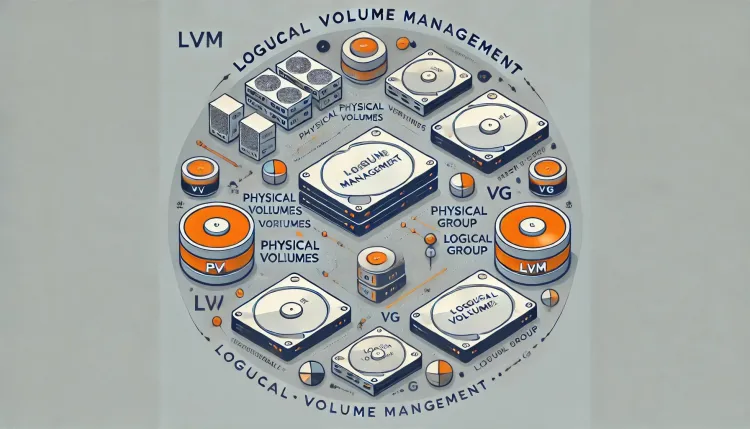
Physical Volumes (PVs): These are the raw storage devices, such as hard drives or RAID arrays, that serve as the base for LVM. They are initialized using LVM commands.
-
Volume Groups (VGs): A volume group is a pool of storage created by combining one or more physical volumes. This pooled space can then be divided into logical volumes.
-
Logical Volumes (LVs): Logical volumes are the equivalent of partitions in LVM. They can be resized, moved, or even mirrored easily within a volume group.
-
Logical Extents (LEs): Logical extents are fixed-size chunks of storage within a logical volume. They map directly to physical extents on physical volumes.
How LVM Works in Linux
Creating LVM Setup
-
Initialize Physical Volumes (PVs): Use the
pvcreatecommand to prepare physical devices for use in LVM.
Example:pvcreate /dev/sda1 /dev/sdb1 -
Create a Volume Group (VG): Combine physical volumes into a volume group using the
vgcreatecommand.
Example:vgcreate my_vg /dev/sda1 /dev/sdb1 -
Create Logical Volumes (LVs): Allocate space from the volume group to create logical volumes with the
lvcreatecommand.
Example:lvcreate -L 50G -n my_lv my_vg -
Format and Mount: Format the logical volume and mount it to make it usable.
Example:mkfs.ext4 /dev/my_vg/my_lv mount /dev/my_vg/my_lv /mnt/mydata
Why Is LVM Useful?
1. Flexible Storage Management
LVM allows you to resize logical volumes easily without unmounting or disrupting the system. For example, you can add more storage to a logical volume if the available space runs out.
2. Easier Disk Upgrades
With LVM, you can add new physical volumes to an existing volume group, migrate data, and remove old disks without downtime. This is especially useful for servers that require continuous availability.
3. Snapshot Support
LVM supports creating snapshots of logical volumes. Snapshots are point-in-time copies of data, which are helpful for backup and recovery.
4. Striping and Mirroring
LVM can stripe data across multiple physical volumes for better performance or mirror data for redundancy, improving both speed and reliability.
5. Simplified Management of Multiple Disks
By pooling physical volumes into a single volume group, LVM eliminates the need to manage multiple partitions and disks individually.
Common Use Cases of LVM
-
Expanding Storage on the Fly: Add a new hard drive to an existing volume group and allocate space to logical volumes without rebooting the system.
-
Creating Backups with Snapshots: Use LVM snapshots to take quick backups of critical data without interrupting active processes.
-
Optimizing Performance with Striping: Stripe data across multiple disks to improve read and write performance for high-demand applications.
-
Efficient Disk Space Allocation: Allocate storage dynamically to ensure that no disk space is wasted.
LVM vs. Traditional Partitioning
| Feature | LVM | Traditional Partitioning |
|---|---|---|
| Flexibility | Highly flexible | Fixed partition sizes |
| Resize Capability | Easy to resize volumes | Requires unmounting |
| Multiple Disk Management | Combines multiple disks seamlessly | Managed individually |
| Snapshots | Supported | Not available |
| Performance Optimization | Supports striping and mirroring | Not supported |
Conclusion
Logical Volume Management (LVM) in Linux offers a dynamic and efficient way to manage disk storage. Its ability to resize, move, and manage storage without disrupting the system makes it an essential tool for system administrators and advanced users. Whether you are running a personal Linux system or managing enterprise-level servers, LVM provides the flexibility and functionality needed to handle modern storage demands.
By understanding and utilizing LVM, you can optimize your storage, ensure better data management, and adapt to changing requirements with ease.
To take this further with guided labs and an instructor, see our our RHCSA classes.
Related reading
- What Is Logical Volume Management in Kali Linux and How to Use It | The Complete Guide
- Linux Disk Management Commands for System Admins
- [2026] Advanced Linux System Admin Interview Questions and Answers
Reference
For the authoritative details, see Red Hat product documentation.
Frequently Asked Questions
What's Your Reaction?
 Like
0
Like
0
 Dislike
0
Dislike
0
 Love
0
Love
0
 Funny
0
Funny
0
 Wow
0
Wow
0
 Sad
0
Sad
0
 Angry
0
Angry
0

Vaishnavi is a skilled tech professional at the Ethical Hacking Training Institute in Pune, responsible for managing and optimizing the technical infrastructure that supports advanced cybersecurity education. With deep expertise in network security, backend operations, and system performance, she ensures that practical labs, online modules, and assessments run smoothly and securely. Her behind-the-scenes contributions play a vital role in delivering a seamless and secure learning experience for aspiring ethical hackers.