
What Is Scan to Pay and How Does It Work? A Step-by-Step Guide to UPI QR Payments
Scan to Pay is a digital payment method where users scan a QR code using a smartphone to instantly pay a merchant. This system uses QR code technology, a payment gateway, and UPI or wallet-based apps like Google Pay, PhonePe, or Paytm. Once the code is scanned, the transaction is processed in real time, securely debiting the amount from the user’s bank account and crediting the merchant’s account. It’s fast, secure, and widely used for contactless payments in India and globally.
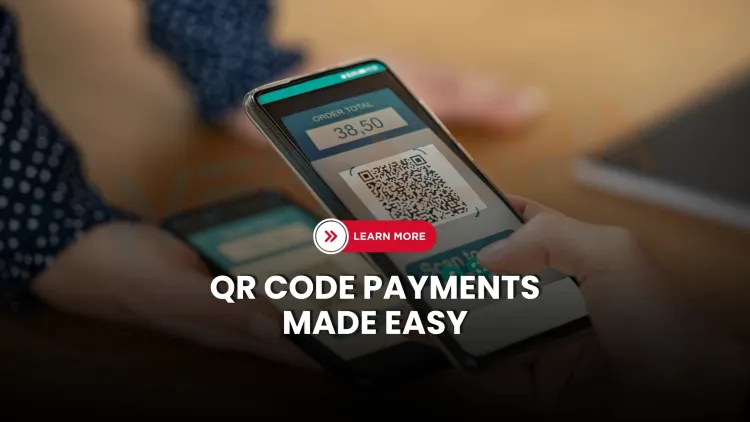
Quick answer: Scan to Pay lets you pay by scanning a QR code that carries the merchant's payment details, usually a UPI address and sometimes the amount. Your payment app reads it, shows the payee name and amount, and after you enter your UPI PIN the bank transfer completes in seconds. You never need to scan a code or enter your PIN to receive money.
Key takeaways
- In India, Scan to Pay usually runs on UPI. The QR code holds payee details, not money.
- Static codes (shop stickers) never expire; dynamic codes are tied to one order.
- Always check the payee name and amount before entering your UPI PIN, and use the PIN only to send money.
- If you are scammed, call 1930 and file at cybercrime.gov.in straight away.
What is Scan to Pay?
Scan to Pay is paying by scanning a QR code with your phone's payment app instead of handing over cash or a card. In India it almost always runs on UPI (Unified Payments Interface), the real-time payment system operated by NPCI. The QR code does not hold money. It holds a few lines of text that tell your app who to pay and, sometimes, how much.
How does Scan to Pay work step by step?
- The merchant shows a QR code. It may be a sticker on the counter (a static code) or one generated on a screen or bill for this one payment (a dynamic code).
- You open a UPI app such as Google Pay, PhonePe, Paytm, BHIM or your bank's own app, and scan the code.
- The app reads the payment details. It extracts the payee's UPI address (the VPA), the payee's name and, for a dynamic code, the amount and reference.
- You check the screen. Look at the payee name and the amount. Enter the amount yourself if the code did not include one.
- You authorise with your UPI PIN (or a device biometric where your app offers it for that transaction).
- The money moves. Your app sends the request through its payment service provider to the UPI network. Your bank debits your account, the merchant's bank credits theirs, and both sides get a confirmation, usually within seconds.
- Keep the proof. The success screen and the transaction reference are your receipt. The merchant should see an alert or notification on their own app or soundbox.
Card checkout through payment gateways such as Stripe is encrypted and tokenised. A plain UPI QR payment is different: it moves money between bank accounts and involves no card number.
What is inside a UPI QR code?
A UPI QR code encodes a link in the UPI payment format. A simplified example with made-up values looks like this:
upi://pay?pa=examplestore@bank&pn=Example%20Store&am=750.00&cu=INR&tn=Order%207845pais the payee address (VPA).pnis the payee name.amis the amount, present in dynamic codes.cuis the currency.tnis a note or reference.
Because the content is just text, anyone can print a QR code with someone else's account in it. That is the root of the scams below.
Static and dynamic QR codes
| Static QR | Dynamic QR | |
|---|---|---|
| Where you see it | Sticker or board at a shop | On a bill, POS screen, invoice or app |
| Amount | You type it | Pre-filled |
| Changes per payment | No, it stays the same | Yes, one code per order |
| Expires | No | Often, after a short time |
| Risk | A fake sticker can be pasted over the real one | Lower, because a fresh code is tied to the order |
The earlier article said QR codes "expire quickly". That applies to dynamic codes only. The static code at a tea stall never expires.
Is Scan to Pay secure?
UPI itself uses strong controls: your UPI PIN is entered in the UPI app, payments are authenticated by your bank, and you never share a card number. Most losses do not come from breaking the system. They come from tricking the person. Know these patterns.
Scams to recognise
- "Scan to receive money." You never need to scan a code or enter your UPI PIN to receive money. Anyone asking you to do so is trying to take money from you. This is common on classified sites, when a "buyer" offers to pay.
- Fake QR stickers. A scammer pastes their own code over a shop's code, a parking meter or a petrol pump board. Always confirm the payee name shown by your app matches the shop.
- QR codes in messages and emails. A QR code that opens a login page or asks you to "verify" an account is a phishing attempt, known as quishing. We cover it in QR code phishing explained.
- Collect requests. A "payment request" that arrives in your app is a request for you to pay, not a refund. Decline requests you did not expect.
- Remote-access apps. A "support agent" who asks you to install a screen-sharing app can see your UPI PIN. Never install one on a stranger's request.
Habits that prevent most losses
- Read the payee name and amount on the confirmation screen before entering your PIN.
- Enter your PIN only to send money.
- Use a screen lock and keep the app updated. Download apps only from the official store.
- Check that the merchant's sticker has not been tampered with. Ask for a payment alert from the merchant's device.
- Never share your PIN, OTP or card details with anyone, including someone claiming to be from your bank.
- Set transaction limits in your bank app if you want an extra safety margin. Limits are set by NPCI and by your bank, and they change, so check the current ones.
If something goes wrong
- Call your bank and the national cyber crime helpline 1930 immediately. Fast reporting gives the best chance of stopping the transfer.
- File a complaint at cybercrime.gov.in.
- Raise a dispute inside your UPI app, using the transaction reference. For general information about the system, see NPCI.
- Keep screenshots, the transaction ID, and any messages.
Where is Scan to Pay used?
Shops and street vendors, restaurants, fuel stations, parking, utility and tax payments, and cash-on-delivery orders where the delivery person shows a QR code. For merchants, a dynamic code linked to a billing system avoids mistakes with typed amounts and makes reconciliation easier.
Career angle
Payment security is a strong career area. Payment apps and fintech firms hire for fraud analytics, application security and incident response, built on skills such as web and mobile security, cryptography and log analysis.
Next steps
If you want to understand how attackers abuse QR codes and payment flows, read QR code phishing explained, how credit card cloning works and how AI prevents e-commerce fraud. For a structured start in security, see WebAsha's cyber security course.
Frequently Asked Questions
What's Your Reaction?
 Like
0
Like
0
 Dislike
0
Dislike
0
 Love
0
Love
0
 Funny
0
Funny
0
 Wow
0
Wow
0
 Sad
0
Sad
0
 Angry
0
Angry
0

Vaishnavi is a skilled tech professional at the Ethical Hacking Training Institute in Pune, responsible for managing and optimizing the technical infrastructure that supports advanced cybersecurity education. With deep expertise in network security, backend operations, and system performance, she ensures that practical labs, online modules, and assessments run smoothly and securely. Her behind-the-scenes contributions play a vital role in delivering a seamless and secure learning experience for aspiring ethical hackers.







![Top 10 Famous Ethical Hackers in India [Updated 2026]](https://www.webasha.com/blog/uploads/images/202608/image_140x98_da23f65c290cfbf1237d77aec58a2f0f.jpg)



