What Is Linux, and What Does the Linux Kernel Do?
Linux is the kernel used by many operating systems, while a Linux distribution combines that kernel with libraries, utilities, applications and maintenance tools. The kernel schedules work, manages memory and devices, and provides services to applications through system calls. A shell or desktop is a separate program.

Topic: Linux Administration in IT Infrastructure · Explainer
Learning path: Linux to RHCSA, lesson 1 of 23
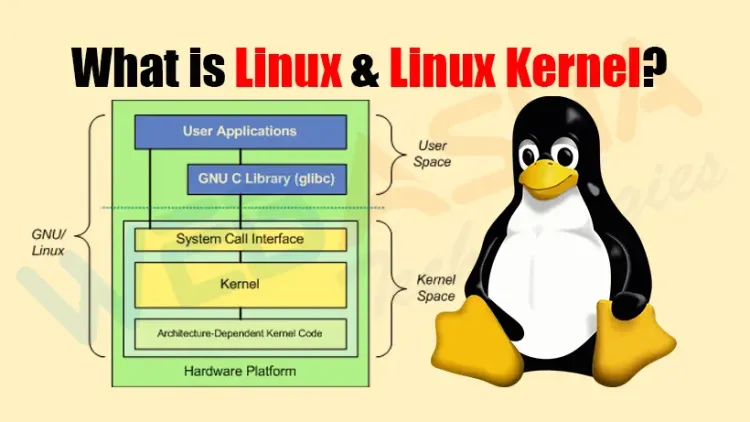
Quick answer: Linux is the kernel used by many operating systems, while a Linux distribution combines that kernel with libraries, utilities, applications and maintenance tools. The kernel schedules work, manages memory and devices, and provides services to applications through system calls. A shell or desktop is a separate program. Following a file-open request through these layers makes the distinction practical: a permission error can come from a kernel-enforced access decision without showing that the kernel itself is broken.
Key takeaways
- Separate the kernel, user-space programs and the complete distribution.
- Applications request kernel services through system-call interfaces.
- Kernel memory management supports protection and controlled sharing.
- A kernel release string does not identify every distribution component.
- Diagnose a failed operation before proposing a kernel replacement.
Table of Contents
- What does Linux mean, and how does it relate to Unix?
- What does a distribution add to the kernel?
- How does an application ask the kernel to open a file?
- What resources does the kernel manage?
- How would you explain a failed file-open request?
- How should you interpret kernel versions and vendor updates?
- What are kernel modules, and what should a beginner learn next?
- References
What does Linux mean, and how does it relate to Unix?
The Linux kernel project introduction describes Linux as independently written, Unix-like software distributed under GPL version 2. Linus Torvalds started the project, and a wider developer community contributes to it. Unix-like describes related interfaces and design ideas; it does not mean every Unix program or driver works unchanged on Linux.
In ordinary conversation, people also use Linux to mean a complete operating system. That usage is useful, provided you distinguish the component being discussed. A failed desktop application, a missing shell utility and a kernel fault require different evidence.
Free software concerns licence permissions to use, inspect, modify and redistribute code under applicable terms. It does not mean every associated support service, application, firmware component or subscription has the same licence or costs nothing. Check the component and distribution rather than assume one rule covers the entire machine.
What does a distribution add to the kernel?
The Debian project operating-system overview explains the kernel's place within an operating system containing basic tools, applications and package management. A distribution chooses versions, default configuration, repositories, an installer and an update process. Many distributions use GNU utilities; those utilities are separate projects, not functions built into the kernel.
A shell interprets commands. A terminal handles a text session. A library provides functions to applications, sometimes wrapping system calls. A service manager supervises services according to its configuration. Replacing one of these components is different from replacing the kernel.
For example, an administrator can update a text editor while retaining the running kernel. Conversely, installing a kernel package and booting that kernel are separate events. Record the running system and the installed software when investigating a problem.
| Component | Example responsibility | Separate question |
|---|---|---|
| Kernel | Schedule processes and enforce memory mappings | Which kernel is running? |
| User-space utility | List directory entries or process text | Which program and options were used? |
| Distribution | Package, configure and maintain components | Which supported release and repositories apply? |
How does an application ask the kernel to open a file?
The Linux system-call interface manual identifies system calls as the application-to-kernel interface and explains that programs commonly use library wrapper functions. A program need not contain low-level machine-specific syscall instructions to request a file operation.
The Linux open system-call manual describes opening a pathname and receiving a file descriptor on success. The descriptor is a process's reference used for later operations such as reading. Opening a file is not the same as displaying its contents, and an application can reject input before it ever requests a kernel operation.
Consider an editor opening a report. The editor prepares the request, a library may wrap the interface, and the kernel resolves the pathname and applies the relevant rules. A failure result travels back to the program, which chooses how to present it. A short dialog may therefore omit details needed for diagnosis.
What resources does the kernel manage?
CPU scheduling decides which runnable work receives processor time. Process management handles execution contexts and lifecycle operations. Device drivers connect kernel facilities to supported hardware. Filesystems and networking provide structured access to storage and communication.
The Linux kernel virtual-memory guide explains virtual memory as an abstraction over physical memory, with demand paging, protection and controlled sharing. Virtual addresses are not a promise that unlimited physical RAM exists. Some data can be shared deliberately while other mappings remain protected.
These mechanisms interact. A program waiting for storage may be slow despite low CPU use. A memory allocation problem can involve workload demand, configured limits and available resources. Saying that the kernel manages memory does not identify the cause of a specific application's failure or justify changing system settings without examining the workload.
How would you explain a failed file-open request?
Use this invented case: a report viewer starts successfully, but opening a supplied pathname produces a permission error. A colleague proposes installing a newer kernel. The available record contains no crash, kernel warning or evidence that a newer kernel addresses the problem.
Begin with the exact pathname, operation and process identity. Ask whether directory search permissions, file access, an ACL or an applicable security policy permits that identity to open it. A file being visible in a directory listing does not establish that the viewer can read it. The open manual documents access-related failures, while the application may add its own checks.
The useful handover asks the owner to review the intended access and relevant evidence. It does not declare a kernel defect or recommend making the file readable by everyone. A denied request can demonstrate enforcement of a rule that is correct, incorrect or simply different from the user's expectation.
| Supplied observation | What it supports | Next evidence |
|---|---|---|
| Viewer starts | An application process could begin | Exact failed operation and pathname |
| Permission error opening report | An access-related failure was reported | Identity, directory traversal and effective policy |
| Newer kernel available | Another release exists | Applicable vendor advisory before an upgrade claim |
How should you interpret kernel versions and vendor updates?
A kernel release and a distribution release name different things. Utilities such as uname report kernel information; distribution release metadata describes the operating-system packaging context. A container can use a host kernel while presenting a different user-space distribution, so a single version string is insufficient for inventory.
The Red Hat security backporting explanation describes applying a security fix from newer upstream software to an older distributed package. Consequently, an older-looking version is not enough to establish that a supported vendor package lacks a particular fix. Check the vendor's advisory and package release information.
For a supported server, compare the proposed change with its compatibility, support and reboot requirements. Avoid replacing a vendor kernel simply to match the latest upstream number. The correct choice depends on the issue being addressed and the supported configuration.
What are kernel modules, and what should a beginner learn next?
A kernel module is code that can extend a running kernel, commonly for driver or filesystem support. Some functionality may instead be built into the kernel. A module listing therefore describes loaded modules, not every feature the kernel contains or every driver available on disk.
Loading or unloading modules changes kernel behaviour and can affect active devices. Learn their purpose from documentation before treating module-management commands as troubleshooting defaults. There is no need to alter the running machine to understand the kernel-versus-user-space distinction.
For a first exercise, draw the report viewer, library interface, kernel, filesystem and storage device as separate components. Mark where the supplied permission error could originate and which observation would narrow it. Then repeat the explanation for a missing application executable. This develops a useful diagnostic habit without rebuilding a kernel or modifying access controls.
Related reading: kernel resource reasoning; Linux file-link rehearsal.
References
Frequently Asked Questions
What's Your Reaction?
 Like
0
 Dislike
0
 Love
0
 Funny
0
 Wow
0
 Sad
0
 Angry
0