How to Prepare for Incident Response: A Step-by-Step Guide for Students
This blog explored the Incident Response Lifecycle through a practical scenario. It highlighted the six phases: preparation, identification, containment, eradication, recovery, and lessons learned. By following these steps and using tools like Splunk and Wireshark, students can gain valuable skills to handle cyber incidents with confidence.
Quick answer: To prepare for incident response, learn the lifecycle first: preparation, identification, containment, eradication, recovery and lessons learned. Then practise it on a small lab. Replay a sample breach, collect logs, write a timeline and report what you did. Add basic tools like a SIEM and Wireshark once the process is clear.
Key takeaways
- Learn the lifecycle in order: preparation, identification, containment, eradication, recovery and lessons learned.
- Practise with tabletop exercises, since plans fail when nobody has rehearsed them.
- Know your contact list and who can approve shutting a system down.
Introduction
Incident response (IR) is a core part of cybersecurity. It lets organisations detect, manage, and recover from cyberattacks while minimising damage. If you want to do well in cybersecurity, you need to master the Incident Response Lifecycle. A practical example makes the process easier to learn step by step.
The Incident Response Lifecycle
The Incident Response Lifecycle, as taught in the SANS model, consists of six key phases (NIST groups the same work into four phases). To understand how these phases work, let’s explore a scenario.
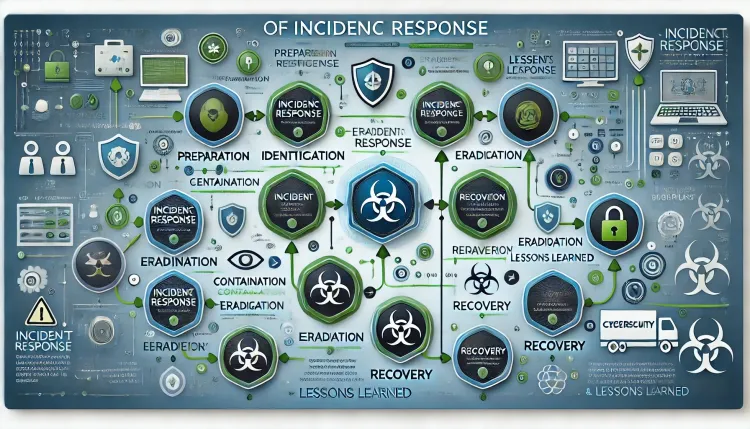
Scenario: A Suspicious Data Breach
Your organization detects unusual system activity. Sensitive employee data has been accessed without authorization. As a member of the Security Operations Center (SOC), your mission is to investigate and manage the situation effectively.
1. Preparation
Objective: Build a strong foundation for responding to incidents.
Actions to Take:
- Develop incident response policies and procedures.
- Train employees to recognize threats like phishing and malware.
- Maintain tools such as firewalls, intrusion detection systems (IDS), and anti-malware software.
- Conduct mock incident simulations to improve readiness.
Scenario Example:
Before the breach, your team provided employees with regular cybersecurity training and maintained a detailed incident response playbook.
2. Identification
Objective: Determine if an incident has occurred and assess its nature.
Actions to Take:
- Use monitoring tools to analyze system logs, network traffic, and alerts.
- Investigate anomalies and confirm whether a security breach has occurred.
Scenario Example:
An IDS flagged an unusually large data transfer during non-business hours. After analyzing logs in Splunk, you confirm that sensitive data was accessed using a compromised user account.
3. Containment
Objective: Limit the scope and impact of the incident.
Actions to Take:
- Isolate affected systems or accounts.
- Implement network segmentation and block malicious IPs.
- Restrict user privileges temporarily to prevent escalation.
Scenario Example:
Your team disables the compromised account and disconnects the affected server from the network, preventing further data exfiltration.
4. Eradication
Objective: Eliminate the root cause of the incident.
Actions to Take:
- Remove malware, fix vulnerabilities, and close security gaps.
- Apply software patches and updates.
- Perform a forensic analysis to understand the attack vector.
Scenario Example:
Forensic analysis reveals that a phishing email led to credential theft. You remove the malicious payload and enhance email filters to block similar threats in the future.
5. Recovery
Objective: Restore systems and operations securely.
Actions to Take:
- Rebuild systems from clean backups.
- Monitor restored systems for signs of lingering threats.
- Communicate with affected parties and rebuild trust.
Scenario Example:
The team restores the server from a clean backup and enforces multi-factor authentication (MFA) for all users to strengthen security.
6. Lessons Learned
Objective: Improve future incident response efforts.
Actions to Take:
- Conduct a post-incident review to analyze the event and its impact.
- Document lessons learned and update response plans accordingly.
- Provide additional training based on the incident.
Scenario Example:
A review highlights gaps in user awareness training. Your team implements monthly phishing simulations to enhance employees’ ability to identify and report threats.
Best Practices for Students Learning Incident Response
- Understand the Basics: Familiarize yourself with the six phases of IR.
- Practice Hands-On Labs: Simulate incidents using platforms like Hack The Box or CyberDefenders.
- Stay Current: Keep up with emerging threats and new IR tools.
- Work as a Team: Effective IR requires strong collaboration and communication skills.
Key Tools for Incident Response
| Tool | Purpose |
|---|---|
| Splunk | Log analysis and event monitoring. |
| Wireshark | Network traffic analysis. |
| FTK (Forensic Toolkit) | Investigating compromised systems. |
| VirusTotal | Scanning files and URLs for malware. |
| Kali Linux | Penetration testing and vulnerability scanning. |
Why Is Incident Response Important?
- Reduces Damage: Prevents financial and reputational losses.
- Protects Data: Safeguards sensitive information from exposure.
- Enhances Security Posture: Encourages continuous improvement in security defenses.
- Ensures Compliance: Helps meet legal and regulatory obligations.
Conclusion
Incident response is a cornerstone of modern cybersecurity. By understanding its phases and practicing real-world scenarios, students can develop the skills needed to tackle cyber threats effectively. Whether responding to a data breach or preparing for a career in cybersecurity, a thorough grasp of incident response will help you excel.
FAQ's
1. What is Incident Response (IR)?
Incident Response (IR) refers to the systematic approach taken by an organization to detect, manage, and recover from security incidents, including cyberattacks and data breaches. The goal is to minimize damage, recover quickly, and prevent future incidents.
2. Why is Incident Response important for cybersecurity?
Incident Response is essential because it helps organizations effectively manage and mitigate the damage caused by security incidents. It reduces financial and reputational harm, protects sensitive data, and strengthens the overall security posture of the organization.
3. What are the phases of the Incident Response lifecycle?
The Incident Response lifecycle includes six key phases:
- Preparation
- Identification
- Containment
- Eradication
- Recovery
- Lessons Learned
4. What tools are commonly used in Incident Response?
Common Incident Response tools include:
- Splunk (for log management and event monitoring)
- Wireshark (for network traffic analysis)
- FTK (Forensic Toolkit for digital forensics)
- Kali Linux (for penetration testing)
- VirusTotal (for malware scanning)
5. How does an Incident Response team handle a data breach?
In the event of a data breach, the Incident Response team follows these steps:
- Identify the breach through log analysis and alerts.
- Contain the breach by isolating affected systems.
- Eradicate the cause, such as malware or unauthorized access.
- Recover systems and restore normal operations.
- Analyze the incident for lessons to prevent future breaches.
6. What is the role of a Security Operations Center (SOC) in Incident Response?
A SOC is a centralized unit responsible for monitoring, detecting, and responding to security incidents. It plays a critical role in Incident Response by identifying potential threats, providing real-time monitoring, and coordinating with other teams to manage security incidents.
7. What is the significance of cybersecurity training in Incident Response?
Cybersecurity training helps employees recognise and report potential security incidents. It builds awareness about phishing attacks, malware, and other common threats, which makes the Incident Response process work better.
8. What is a phishing attack, and how does it relate to Incident Response?
A phishing attack involves fraudulent attempts to obtain sensitive information, such as login credentials, by pretending to be a trustworthy entity. It often serves as the entry point for a larger security breach. Incident Response teams need to identify, contain, and mitigate the consequences of phishing attacks.
9. How can Splunk be used in Incident Response?
Splunk is a powerful tool for aggregating and analyzing log data, which helps Incident Response teams detect unusual activity, trace attacks, and generate actionable insights. It is often used during the Identification and Containment phases of Incident Response.
10. How can organizations improve their Incident Response capabilities?
Organizations can improve their Incident Response by:
- Regularly training staff on security awareness and response procedures.
- Establishing clear incident response plans and policies.
- Implementing effective monitoring tools and techniques.
- Conducting regular simulations and tabletop exercises to test their readiness.
To take this further with guided labs and an instructor, see our ECIH v3 certification programme.
Related reading
- How To Become A Cyber Security Analyst
- Incident Response in Digital Forensics | A Begineers-Friendly Guide
- What Are the Six Phases of Incident Response in Cybersecurity? Step-by-Step Guide for 2026
Reference
For the authoritative details, see NIST Special Publications.
Frequently Asked Questions
What's Your Reaction?
 Like
0
Like
0
 Dislike
0
Dislike
0
 Love
0
Love
0
 Funny
0
Funny
0
 Wow
0
Wow
0
 Sad
0
Sad
0
 Angry
0
Angry
0

Vaishnavi is a skilled tech professional at the Ethical Hacking Training Institute in Pune, responsible for managing and optimizing the technical infrastructure that supports advanced cybersecurity education. With deep expertise in network security, backend operations, and system performance, she ensures that practical labs, online modules, and assessments run smoothly and securely. Her behind-the-scenes contributions play a vital role in delivering a seamless and secure learning experience for aspiring ethical hackers.