Podman on RHEL 10: Practical Guide for System Admins
Install Podman on RHEL 10, run rootless containers, manage SELinux storage and networking, and keep services running with systemd Quadlet.
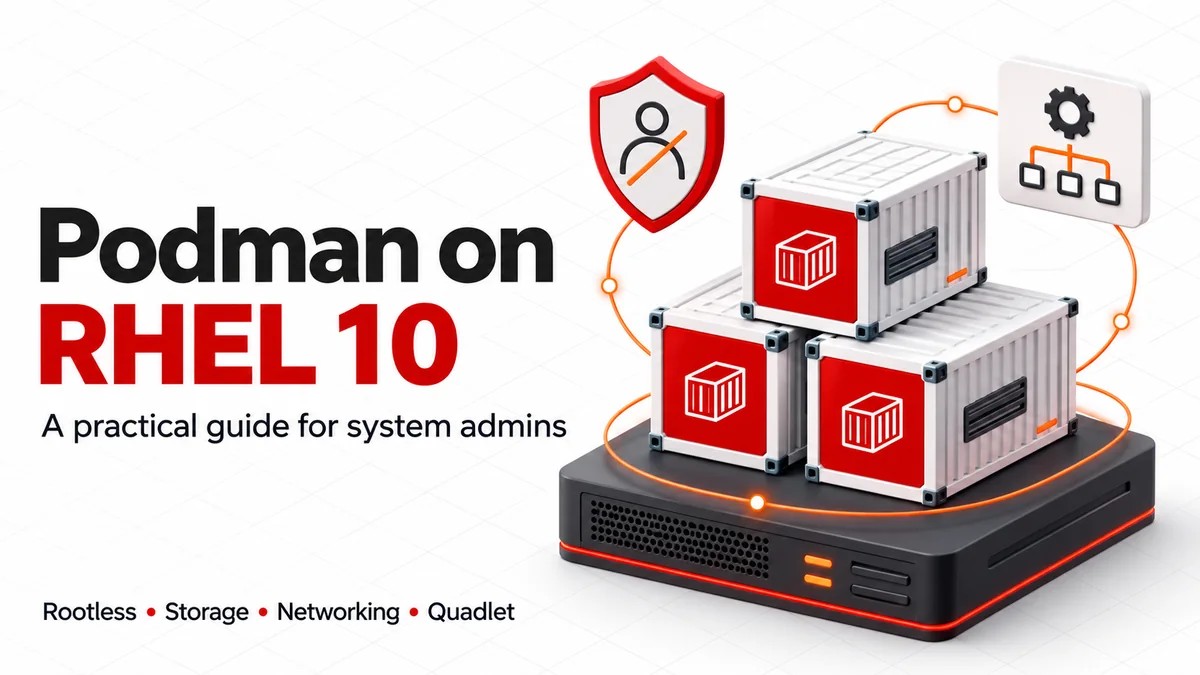
To run Podman on RHEL 10, install the engine from the RHEL repositories, use an ordinary account for rootless containers, store application data outside the container’s writable layer, and use a systemd Quadlet for services that must return after reboot. Most failures come from crossing the wrong user, storage or network boundary.
Keep these decisions explicit
- Run application commands as the same account that owns the service.
- Publish the actual application port; start with host loopback.
- Check permissions and SELinux labels separately.
- Use Quadlet’s install section and user linger for boot persistence.
- Record the installed RPM and approved image digest.
What changes for Podman on RHEL 10?
Podman is a daemonless engine for OCI containers and pods. You can run it as an ordinary Linux user, while systemd manages a long-running application’s lifecycle. Installing the engine does not automatically create a supervised application service. [5]
RHEL 10 uses Netavark for container networking and defaults to pasta for rootless network connectivity. These solve different layers of the problem: Netavark configures container networks; pasta provides connectivity across the rootless network boundary. CNI is unsupported on RHEL 10. Avoid carrying CNI configuration into a new deployment. [1] [9]
| RHEL release | Release-note version | Administrator action |
|---|---|---|
| 10.0 | Podman 5.4 | Use the 5.4-compatible examples below. |
| 10.1 | Podman 5.6 | Check the local manual before using newer Quadlet keys. |
| 10.2 | Podman 5.8.2 | Check errata and the installed RPM release. |
These are release-note baselines, not a promise about every patched host. Capture rpm -q podman and podman info with any incident report. The guide was researched on 11 November 2026 and does not assume every RHEL 10 host has the same minor release. [2] [3] [4]
For the broader OS context, see WebAsha’s RHEL 10 feature guide.
Install Podman and record the environment
Use a disposable RHEL 10 VM with systemd, SELinux enforcing, access to the appropriate RHEL repositories and an ordinary account with sudo for host administration. Allow outbound registry access and keep the account’s container storage on local disk. This lab needs a free TCP port 8080. No paid cloud resources are required.
cat /etc/redhat-release
sudo dnf repolist --enabled
sudo dnf install podman curl
podman --version
rpm -q podman
podman info
getenforce
Read the DNF transaction before accepting it. If repositories are missing, use your organisation’s subscription or cloud repository procedure; repository identifiers depend on architecture and provisioning method. The optional container-tools RPM metapackage provides a broader toolset, including Buildah and Skopeo. RHEL 10 installation does not require a RHEL 8 module-enable command. [19] [2]
Inspect the rootless flag, network backend, OCI runtime and cgroup version in podman info. A standard RHEL 10 setup should use Netavark and cgroups v2. Configuration or an older migrated installation can affect what you see. Use man podman and man podman-systemd.unit from the installed package when online examples disagree.
Choose one rootless account and keep its context
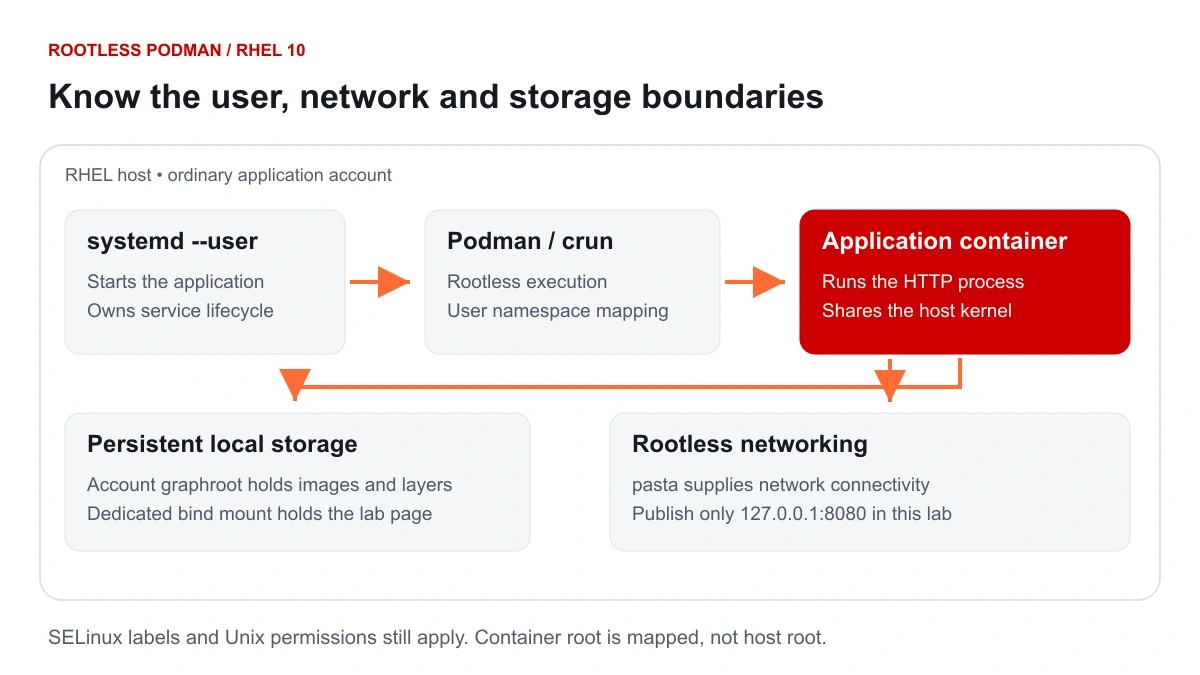
Run every application command below from the same ordinary account. A rootless container belongs to that account’s Podman storage and namespace. Running sudo podman ps queries root’s separate container store, so an apparently missing container may simply belong to another user.
| Property | Rootless workflow | Rootful workflow |
|---|---|---|
| CLI | podman as the application user |
sudo podman |
| Default persistent storage | ~/.local/share/containers/storage |
/var/lib/containers/storage |
| Quadlet source | ~/.config/containers/systemd/ |
/etc/containers/systemd/ |
| Service manager | systemctl --user |
sudo systemctl |
| Privilege boundary | Container root is mapped through a user namespace | Container execution has host-root authority; apply suitable isolation |
Check subordinate UID and GID mappings
id
grep "^$(id -un):" /etc/subuid /etc/subgid
podman unshare cat /proc/self/uid_map
podman unshare cat /proc/self/gid_map
A normal rootless setup needs subordinate UID and GID ranges. If an allocation is missing, have the administrator assign non-overlapping ranges using the organisation’s identity policy. Do not append an example range to every user: overlapping mappings can expose another account’s files. Rootless container storage on NFS is unsupported; an NFS home requires a local-disk graphroot configured for the account. [5]
Changing existing mappings is a maintenance task. Plan for workload interruption and check ownership consequences. podman system migrate can stop that user’s running containers and pause process; it is not a harmless configuration reload. [15]
Run a rootless HTTP service you can verify
The lab serves a static page with Red Hat’s UBI 10 Apache HTTP Server image. This is an application image; a base UBI shell image does not start a web server by itself. The HTTP service uses container port 8080. [11] [12]
mkdir -p "$HOME/podman-lab/html"
printf '%s\n' 'WebAsha Podman lab' > "$HOME/podman-lab/html/index.html"
chmod 755 "$HOME/podman-lab" "$HOME/podman-lab/html"
chmod 644 "$HOME/podman-lab/html/index.html"
IMAGE=registry.access.redhat.com/ubi10/httpd-24:latest
podman pull "$IMAGE"
podman image inspect --format '{{index .RepoDigests 0}}' "$IMAGE"
podman run -d --name web-lab \
  -p 127.0.0.1:8080:8080 \
  -v "$HOME/podman-lab/html:/var/www/html:ro,Z" \
  "$IMAGE"
podman ps --filter name=web-lab
podman port web-lab
curl --fail --show-error http://127.0.0.1:8080/
Expected result: the final request returns WebAsha Podman lab. If startup takes a moment, inspect the logs before retrying the request. The bind is restricted to host loopback, so other machines cannot access this example directly. The ro mount prevents the container from editing the host page.
latest keeps a first lab easy to start, but it changes over time. Record the actual digest returned by inspection. For production, approve an image digest, test it, and use that immutable reference in the service definition. A digest identifies content; it does not establish publisher trust or prove an image is secure.
podman logs --tail 50 web-lab
podman inspect web-lab
podman exec web-lab id
Inspect the container user and mounts before diagnosing a permission problem. A non-root image user still needs access to the files you mount.
Persist data without bypassing SELinux
A container’s writable layer belongs to that container. Removing and recreating it discards changes in that layer. Store application data in a bind mount or named volume, and back it up independently of the image.
| Storage | Useful for | Operational concern |
|---|---|---|
| Bind mount | A known host directory, such as the static lab content | Host permissions and SELinux labels must allow the image user to read or write. |
| Named volume | Application-managed state with a stable Podman volume name | Keep a volume inventory, consistent backups and restore instructions. |
| Writable layer | Temporary container-local changes | Recreating the container loses those changes. |
The lab’s :Z requests a private SELinux label. Use :z only when the same content intentionally needs a shared container label. Neither label fixes Unix ownership. Relabel only dedicated application directories; never recursively relabel a home directory, /etc or another system tree to make a mount work. [6]
Verify a named volume survives container removal
podman volume create webasha-data
podman run --rm \
  -v webasha-data:/data \
  registry.access.redhat.com/ubi10/ubi:latest \
  sh -c 'printf "%s\n" "persistent lab data" > /data/check.txt'
podman run --rm \
  -v webasha-data:/data:ro \
  registry.access.redhat.com/ubi10/ubi:latest \
  cat /data/check.txt
Expected result: the second temporary container prints persistent lab data. Both containers are removed by --rm, while the named volume remains. This simple write uses the base image’s default container user; it does not prove permissions for a database image with a different UID.
For a permission failure, inspect ls -ldZ on the host path, podman exec ... id in the container, and the user namespace mapping. Use image-specific ownership guidance. The :U option can recursively change host ownership, so assess the path and backup before using it. Avoid chmod 777 as a troubleshooting shortcut.
Diagnose networking from the application outward
First establish that the process is listening on the correct container port. Then check the published host address and port. Only after local access works should you investigate remote routing, firewalld, cloud rules or a reverse proxy.
podman logs --tail 100 web-lab
podman port web-lab
ss -ltn '( sport = :8080 )'
curl --fail --show-error http://127.0.0.1:8080/
podman network ls
Rootless networking defaults to pasta on RHEL 10. An application on 127.0.0.1 inside a container may be unreachable through publishing; configure it to listen on the container interface or wildcard address as appropriate. A successful host-loopback request does not prove remote access. [9]
Use a named network for related containers
podman network create app-net
podman network inspect app-net
New containers join it with --network app-net. On a DNS-enabled bridge network, applications can resolve container names or network aliases. Creating a network does not move an existing container onto it. Keep separate applications on separate networks unless they need to communicate. [10]
To expose a service beyond the host, deliberately change its published address and assess the firewall zone attached to the receiving interface. Check sudo firewall-cmd --get-active-zones and sudo firewall-cmd --zone=ZONE --list-all, replacing ZONE with the actual active zone. Make a narrow rule through your normal change process and verify it from an authorised client. Do not open a firewall port for this loopback-only lab. On deployments using Netavark port forwarding, review the RHEL minor release’s StrictForwardPorts behaviour rather than assuming publishing and firewalld have identical effects. [3]
Manage the application with systemd Quadlet
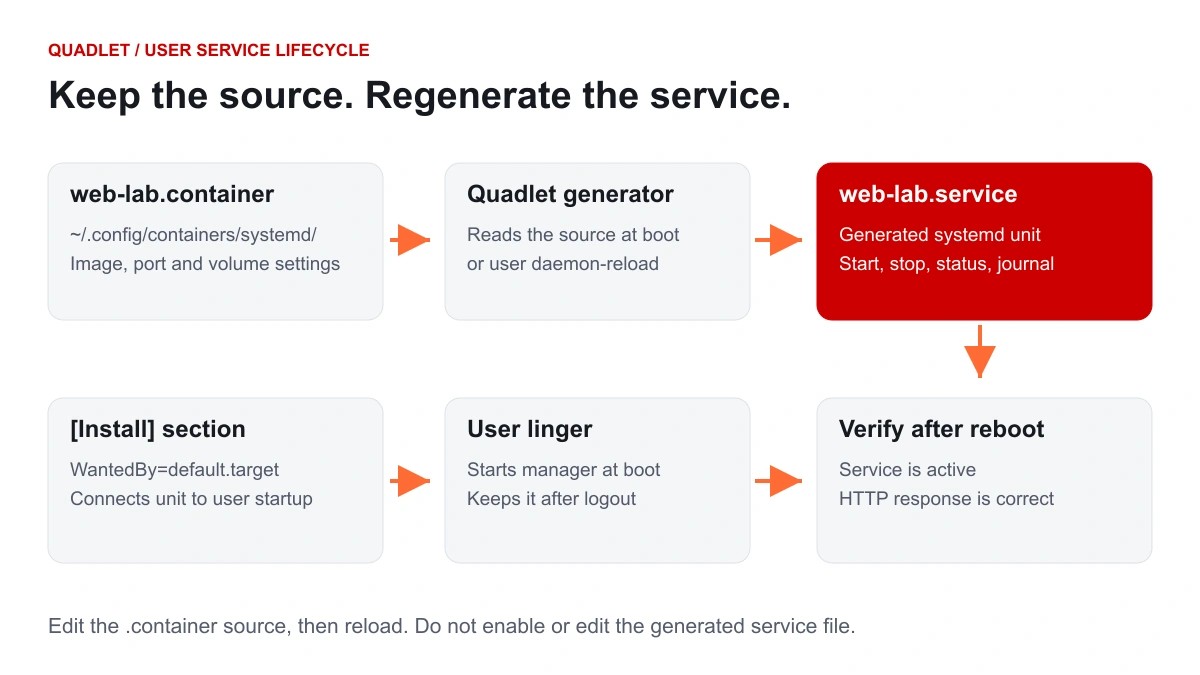
A Quadlet source file describes the container. Podman’s generator creates a systemd service when the user manager starts or reloads. Red Hat recommends Quadlet for new container service configurations. [8]
Stop and remove the earlier lab container before handing its name to systemd. The following removal deletes that container’s writable layer; the dedicated host directory remains. Do this only for the disposable web-lab container created above.
podman stop web-lab
podman rm web-lab
mkdir -p "$HOME/.config/containers/systemd"
cat > "$HOME/.config/containers/systemd/web-lab.container" <<'EOF'
[Unit]
Description=WebAsha rootless HTTP lab

[Container]
Image=registry.access.redhat.com/ubi10/httpd-24:latest
ContainerName=web-lab
PublishPort=127.0.0.1:8080:8080
Volume=%h/podman-lab/html:/var/www/html:ro,Z

[Service]
Restart=on-failure
RestartSec=5
TimeoutStartSec=180

[Install]
WantedBy=default.target
EOF
systemctl --user daemon-reload
systemctl --user start web-lab.service
systemctl --user status web-lab.service
curl --fail --show-error http://127.0.0.1:8080/
The source is web-lab.container; the generated service is web-lab.service. The explicit ContainerName keeps the CLI container name consistent with the lab. %h expands to the service user’s home directory. The longer startup timeout gives an initial image pull more time.
Keep the service available after logout and reboot
sudo loginctl enable-linger "$(id -un)"
loginctl show-user "$(id -un)" -p Linger
systemctl --user is-active web-lab.service
journalctl --user -u web-lab.service -n 50 --no-pager
The Quadlet’s [Install] section attaches the generated unit to default.target. Linger allows the user manager to start at boot and remain after logout. Do not run systemctl --user enable web-lab.service on the generated unit: Quadlet applies the install relationship during generation. [7]
After an approved lab reboot, check loginctl show-user, systemctl --user status web-lab.service, the current-boot journal and the HTTP response. A single successful start does not verify boot persistence. Keep using systemctl for this application’s lifecycle; stopping the container directly can conflict with service restart policy.
If systemctl --user cannot connect to the bus, use a normal login or SSH session for the application user. An incomplete su or sudo environment may lack the user runtime directory and manager connection. For a system-level deployment, put the Quadlet in /etc/containers/systemd/, use the system manager, and review the workload’s elevated authority.
Operate, update and recover the service
Separate process state from application health
systemctl --user status web-lab.service
journalctl --user -u web-lab.service -b --no-pager
podman logs --tail 100 web-lab
podman inspect --format '{{.State.Status}} {{.State.ExitCode}}' web-lab
podman stats --no-stream web-lab
running means the container process is alive. The HTTP request checks whether it serves the expected content. A Podman health check needs a command that exists inside the image and tests a meaningful endpoint. This lab does not configure one; podman healthcheck run web-lab will report an error if no health check exists. The documented exit statuses are 0 for success, 1 for a failed check and 125 for an execution error. [16]
Use a controlled image update
- Record the deployed image reference, approved digest, Quadlet source and backup location.
- Pull and test the candidate image under a different lab name and free loopback port.
- Change
Image=to the approved digest reference. - Run
systemctl --user daemon-reload, thensystemctl --user restart web-lab.serviceduring the change window. - Check service logs, the HTTP response and application data. Retain the previous image and configuration until rollback is no longer needed.
Pulling an image does not replace an already running container. An image rollback also cannot undo an incompatible database schema migration. Schedule and test updates with the application’s recovery procedure.
Back up data and prove restoration
The static lab uses a bind mount, so back up ~/podman-lab/html along with the Quadlet. For the separate named-volume exercise, no writer remains after the two temporary containers exit. Export it to a protected backup directory:
mkdir -p "$HOME/podman-lab/backups"
chmod 700 "$HOME/podman-lab/backups"
podman volume export webasha-data \
  --output "$HOME/podman-lab/backups/webasha-data.tar"
tar -tf "$HOME/podman-lab/backups/webasha-data.tar"
Volume export creates a tar archive; it does not coordinate a live database backup. Quiesce writers or use application-native backup tools, protect backup contents, and rehearse restoration into a separate volume before relying on them. [14]
Use podman system df to inspect disk usage before cleanup. Removing containers, images or volumes can remove data or rollback options. Avoid blanket prune commands on a shared host.
Handle registry access and runtime security
The public UBI image in this lab does not require the private-registry login shown here. For registry.redhat.io or your own private registry, use the identity and access policy approved for that registry. On Linux, Podman’s default authentication file lives under the runtime directory and is ephemeral.
mkdir -p "$HOME/.config/containers"
chmod 700 "$HOME/.config/containers"
podman login --authfile "$HOME/.config/containers/auth.json" registry.redhat.io
chmod 600 "$HOME/.config/containers/auth.json"
A persistent auth file must also be selected by the process pulling the image. For an authenticated Quadlet deployment, add Environment=REGISTRY_AUTH_FILE=%h/.config/containers/auth.json under [Service]. Do not assume that creating the file changes every process’s default lookup path. Its credential encoding is not encryption; exclude it from version control and backups that lack suitable protection. [13]
Use fully qualified image names, retain TLS verification, keep SELinux enforcing and grant only the capabilities the application needs. Avoid privileged mode and broad host mounts for ordinary web services. Evaluate read-only root filesystems, dropped capabilities and resource limits in a staging deployment; an image that writes runtime files may need explicit writable paths.
Podman’s API socket permits substantial control over the account’s workloads. Do not expose it over an unauthenticated network connection. A CLI compatibility wrapper also does not establish complete Docker API, Compose or plugin compatibility. Validate the specific client workflow rather than assuming every Docker integration transfers unchanged.
Troubleshoot common RHEL 10 Podman failures
| Symptom | First checks | Likely correction |
|---|---|---|
| Container vanishes under sudo | id; compare the intended account with root’s store |
Return to the application owner; keep CLI and service scope consistent. |
| No subordinate IDs / newuidmap failure | /etc/subuid, /etc/subgid, namespace mappings |
Have the administrator allocate valid non-overlapping ranges. Plan migration downtime if mappings change. |
| Mounted content returns permission denied | Host ls -ldZ, container UID, sudo ausearch -m AVC -ts recent if audit tools are installed |
Correct the dedicated directory’s ownership and appropriate container label. |
| Name already in use | podman ps -a; service state |
Stop the owner and remove only the known disposable conflict, or choose a different name. |
| Port already allocated | ss -ltn, podman port |
Choose a free host port; keep the application’s actual container port. |
| HTTP works locally, fails remotely | Published host address, active firewall zones, upstream rules | Loopback is intentional in this lab. Review exposure before changing it. |
| Quadlet service not found | Source path, file suffix, installed Quadlet keys, daemon-reload |
Fix the source file; do not edit generator output. |
| Service fails after reboot | Linger, WantedBy, image credentials, current-boot journal |
Restore the user manager and persistent configuration required at boot. |
| Image pull reports unauthorised / certificate error | Registry hostname, authfile selected by service, CA trust, proxy | Use the correct registry identity and trusted CA; keep TLS validation enabled. |
For generator failures, the upstream diagnostic is /usr/lib/systemd/system-generators/podman-system-generator --user --dryrun. Run it as the application user; if the executable path differs, locate it with rpm -ql podman. Check its output for unsupported keys and syntax errors. After a fix, reload the user manager and inspect systemctl --user cat web-lab.service.
Record the failure before making a change. Useful evidence includes the full Podman RPM version, service status, recent logs, image digest, mount definitions and whether the same account ran each command. Redact registry tokens and application secrets before sharing diagnostics.
Move an older Podman workload to RHEL 10
Inventory images, mounted data, network definitions, container owners and startup units before upgrading the host. RHEL 10 no longer supports CNI networking; recreate affected container networking from declarative definitions, preserving data separately. Confirm the runtime on the target host and use Red Hat’s migration procedure where an older runtime is configured. [1]
Test the application on the target kernel and architecture, check image support, then rehearse restore and cutover. Exporting an image is not a backup of mounted application data. Keep the old deployment available until the new service and its recovery procedure pass acceptance checks.
For several related containers on one host, decide whether a pod or separate networks and services fit their lifecycle. Podman can consume and generate supported Kubernetes YAML, but a standalone Podman host does not provide a Kubernetes scheduler or multi-node availability. Use OpenShift or another appropriate orchestrator when those are workload requirements. For OS migration planning, read RHEL 10 compared with RHEL 9 and 8.
Practice the workflow and map the learning
Complete these acceptance tasks in a disposable VM without changing the host’s security defaults:
- Record the OS minor release, Podman RPM, rootless state and network backend.
- Serve the expected page on host loopback and explain both sides of the port mapping.
- Recreate the container while keeping the host page, then read the named-volume marker from a fresh container.
- Start the application through Quadlet, log out and verify it from a separate authorised session.
- During an approved reboot, verify the service returns and the data remains.
- Change the lab to a free host port, restore it, and document the evidence used to diagnose the mismatch.
Red Hat’s EX188 objectives include working with images, Containerfiles, runtime settings, volumes, registries and container troubleshooting. This guide covers part of those operating skills; it is not a complete exam syllabus. Image building and multi-container application work need additional practice. Confirm your designated exam version against Red Hat’s current objectives before booking. [17]
Frequently asked questions
Which Podman version comes with RHEL 10?
The documented baselines are 5.4 for RHEL 10.0, 5.6 for 10.1 and 5.8.2 for 10.2. Use rpm -q podman to identify your installed package, including the release and errata level. [2] [3] [4]
Do I need to enable a Podman daemon?
Local container commands do not require a central Podman daemon. Use a Quadlet-generated systemd service to supervise the application. An API socket is a separate integration feature.
Is root inside a rootless container root on the host?
Its IDs are mapped through a user namespace. That reduces host privilege, but mounts, credentials and the application user’s own access still matter.
Should I disable SELinux to fix a volume error?
Keep it enforcing. Check the mount’s label, file permissions and mapped user IDs. Relabel only the dedicated application content that actually needs container access.
Why does systemctl enable fail for my Quadlet service?
The service is generated. Put the install relationship in the Quadlet source, reload the manager and start the service. For a rootless service required at boot, also configure linger for its owning account.
Does podman compose work without another provider?
podman compose delegates to an external Compose provider. Provider installation, packaging and compatibility need separate validation on your RHEL minor release. Use the native Quadlet workflow here for the single service. [20]
Can rootless Podman publish port 80?
The host’s net.ipv4.ip_unprivileged_port_start setting determines the privileged-port boundary. Use a high host port in the lab and an approved proxy or service design for production. Becoming root just to publish port 80 changes the security boundary.
Before you call the deployment complete
A useful Podman deployment has a known owner, a reproducible image reference, persistent data and a service lifecycle that survives the conditions you tested. On RHEL 10, use rootless execution where the workload permits, understand pasta and Netavark, keep SELinux enforcing and manage new services with Quadlet. Confirm the HTTP response, logout behaviour, reboot recovery and backup restoration before relying on the service.
Official references
- RHEL 10 container adoption considerations
- RHEL 10.0 release notes: container tools
- RHEL 10.1 release notes: container tools
- RHEL 10.2 release notes: container tools
- Podman 5.4 manual: rootless operation and storage
- Podman 5.4 run reference
- Podman 5.4 Quadlet reference
- RHEL 10: porting containers to systemd
- RHEL 10: communicating among containers
- Podman 5.4 network create reference
- Red Hat catalog: UBI 10 Apache HTTP Server 2.4
- Apache container image source and usage
- Podman registry login and credential persistence
- Podman 5.4 volume export reference
- Podman 5.4 system migrate reference
- Podman 5.4 healthcheck run reference
- Red Hat EX188 exam description and objectives
- Podman getting started guide
- Podman installation instructions
- Podman 5.4 Compose provider reference
What's Your Reaction?
 Like
0
 Dislike
0
 Love
0
 Funny
0
 Wow
0
 Sad
0
 Angry
0
With a passion for staying on the cutting edge of technology trends, I am dedicated to delivering content that not only informs but also inspires. Whether you need in-depth analysis pieces, informative guides, or thought-provoking opinion pieces, I craft content that resonates with tech enthusiasts and professionals alike.