
Why Ethical Hackers Prefer Linux, and Which Distribution to Start With
Ethical hackers rely on Linux over Windows and macOS due to its open-source nature, robust security, powerful command-line tools, and extensive penetration testing capabilities. This blog explores why Linux is the top choice for ethical hacking, discussing its customization, privacy features, and stability. It also highlights the best Linux distributions for cybersecurity professionals, including Kali Linux, Parrot Security OS, and BlackArch Linux. A comparison table provides insights into how Linux outperforms Windows and macOS in hacking tasks. Whether you are a beginner or an experienced penetration tester, understanding Linux’s advantages is crucial for excelling in ethical hacking and cybersecurity.
Quick answer: Ethical hackers prefer Linux because most security tools are built for it first, the Bash shell makes scanning and log analysis easy to automate, and the system is open and fully configurable. Kali Linux is the usual starting distribution. Windows and macOS can run many tools, but professionals still learn Linux because it is also what most servers run.
Key takeaways
- Most security tools (Nmap, Wireshark, Metasploit, Aircrack-ng) start on Linux, and Wi-Fi testing features work most reliably there.
- Kali Linux is the standard starting point; run it in a virtual machine, not as your daily system.
- Linux is not magically unhackable. Its value is control, tooling and the fact that it is the system you will test and defend.
- Practise only on systems you own or have written permission to test.
Why does the operating system matter at all?
Because security tools talk to the network and the kernel directly. A port scanner crafts raw packets, a wireless tool puts a network card into monitor mode, a forensic tool reads a disk block by block. Linux lets you do all of this without fighting the operating system, and most security tools are written and tested on Linux first.
The practical reasons, one by one
1. Tools are built for it first
Nmap, Wireshark, tcpdump, Metasploit Framework, Aircrack-ng, John the Ripper, sqlmap and Hydra all start life on Linux. Many also run on Windows or macOS, but some features (monitor mode and packet injection for Wi-Fi testing, raw socket scans) work most reliably on Linux. Check each tool's own documentation for what your platform supports; the Nmap reference guide is a good example of a tool that documents platform differences openly.
2. The shell is the interface
Security work is repetitive. You scan fifty hosts, filter the open ports, feed the result to the next tool. In Bash you do this with pipes, loops and small scripts. For example, this lists unique IPs that appear in an authentication log, which is a typical defensive task:
grep "Failed password" /var/log/auth.log | awk '{print $(NF-3)}' | sort | uniq -c | sort -rn | headPowerShell is also a very capable shell, and Windows defenders use it daily. The difference is that the open-source security ecosystem assumes Bash, so tutorials, scripts and tool output formats fit it directly.
3. You can see and change everything
Linux is open source. You can read how a service is configured, swap the kernel, strip the desktop and run a lean box with only the tools you need. That matters when you are learning, because you can open any component and see why it behaves as it does.
4. Free to install and easy to repeat
There is no licence fee, so you can build ten lab machines on one laptop with VirtualBox or VMware and rebuild them in minutes. For a student in India buying their own hardware, that is a real saving. Keep the legal side in mind though: free software does not mean free to use on any target. You still need written permission to test any system you do not own.
5. It is what you will attack and defend
Most web servers, cloud instances and containers run Linux. If you cannot move around a Linux box, read its logs and understand file permissions, you cannot test it or defend it. Learning Linux is not only a tool choice, it is learning the target.
Which Linux distribution should you use?
For most learners, Kali Linux. Pick another only if you have a specific reason.
| Distribution | Based on | Best for | Note |
|---|---|---|---|
| Kali Linux | Debian | Penetration testing, courses and certifications | Maintained by OffSec. Ships with several hundred security tools; the exact count changes by release, so check the Kali documentation. |
| Parrot Security | Debian | Pentesting plus privacy and development work | A different default tool selection and desktop. A reasonable alternative. |
| BlackArch | Arch Linux | Experienced users who want a very large tool repository | Needs comfort with Arch administration. Not a beginner choice. |
| Tails | Debian | Privacy and anonymity, booted from USB | Not a penetration testing distribution. It routes traffic through Tor and leaves no trace on the host. |
| Ubuntu or Debian | - | Learning Linux itself, daily work | Install only the tools you need. |
The original version of this article listed BackBox as well. It is a smaller Ubuntu-based project, and you will rarely meet it in courses, so we left it out. Kali is also what the OffSec and EC-Council course material assumes.
Linux, Windows and macOS compared honestly
| Point | Linux | Windows | macOS |
|---|---|---|---|
| Security tool availability | Widest; most tools are native | Many tools run; some need WSL2 or a VM | Many tools via Homebrew; some Linux-only features missing |
| Raw network control | Direct | Possible, with drivers and workarounds | Possible, more limited for Wi-Fi injection |
| Command-line automation | Bash, standard in tutorials | PowerShell, strong for Windows and Active Directory work | Zsh, Unix-like |
| Licence | Free | Paid | Tied to Apple hardware |
| Needed to attack or defend Windows environments | Via remote tools | Native knowledge of AD and Windows internals | Rarely |
One claim worth correcting: Linux is often called "inherently more secure" than Windows. That is too simple. Linux has a good permission model, SELinux and AppArmor, and a smaller attack surface when you install only what you need, but Linux systems get vulnerabilities and are breached daily when misconfigured. A professional also needs Windows skills, because most enterprise networks run Active Directory. Treat Linux as your main workbench, not your only OS.
Built-in Linux security features worth learning
- File permissions and users. Every file has an owner, a group and read/write/execute bits. Misconfigured permissions are a common finding in real assessments.
- Firewalls. iptables and its successor nftables sit in the kernel. ufw and firewalld are friendlier front ends.
- SELinux and AppArmor. Mandatory access control that limits what a process can do even if it is compromised. SELinux is central to Red Hat systems.
- Encryption tools. GnuPG, OpenSSL and disk encryption with LUKS.
- Logging. journald and /var/log tell you what happened. Reading logs is the core defensive skill.
Common mistakes beginners make
- Installing Kali as the daily system. Kali is built for security work and is not designed as a general desktop. Use a virtual machine.
- Collecting tools without learning Linux. If you cannot explain what
chmod 640does or how a systemd service starts, tool knowledge will not hold up. - Pointing tools at real sites. Scanning or attacking systems you do not own or have written authorisation for is an offence under India's IT Act, 2000. Practise on your own VMs, Metasploitable, DVWA or a platform built for it such as Hack The Box.
- Using Tails as a hacking OS. It exists for privacy, not for testing.
A sensible way to start
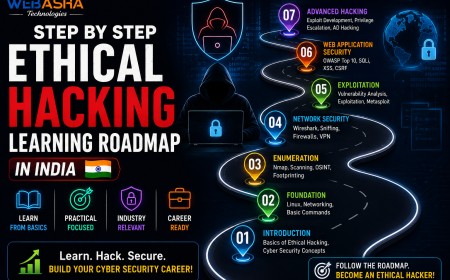
- Install VirtualBox or VMware and create an Ubuntu or Debian VM. Learn files, permissions, users, processes, services and networking from the command line.
- Add a Kali Linux VM and a deliberately vulnerable target such as Metasploitable on a host-only network, so nothing touches the internet.
- Learn Nmap, Wireshark and tcpdump properly before touching exploitation tools.
- Read the logs on your target after each exercise. Seeing what your scan looked like from the defender's side is the most useful habit you can build.
Next steps
If you want guided practice on Linux first, the Linux course at WebAsha covers the administration skills this article relies on, and the CEH v13 AI course shows how those skills are used in an ethical hacking syllabus. For tool detail, read why Kali Linux is preferred by security professionals and Linux essentials for cybersecurity professionals.
Related reading
Frequently Asked Questions
What's Your Reaction?
 Like
0
Like
0
 Dislike
0
Dislike
0
 Love
0
Love
0
 Funny
0
Funny
0
 Wow
0
Wow
0
 Sad
0
Sad
0
 Angry
0
Angry
0

Vaishnavi is a skilled tech professional at the Ethical Hacking Training Institute in Pune, responsible for managing and optimizing the technical infrastructure that supports advanced cybersecurity education. With deep expertise in network security, backend operations, and system performance, she ensures that practical labs, online modules, and assessments run smoothly and securely. Her behind-the-scenes contributions play a vital role in delivering a seamless and secure learning experience for aspiring ethical hackers.









![Top 10 Famous Ethical Hackers in India [Updated 2026]](https://www.webasha.com/blog/uploads/images/202608/image_140x98_da23f65c290cfbf1237d77aec58a2f0f.jpg)