Cyberattack hits 178 major global brands, exposing visitors to data theft
An Optimizely supply-chain attack reportedly exposed visitors to malicious JavaScript on websites associated with 178 organisations, including Zoom, the BBC, CNN, HSBC and IKEA, on 16 November 2026. The reported exposure does not establish that every visitor lost data or that each company’s internal systems were breached.

An Optimizely supply-chain attack reportedly exposed visitors to malicious JavaScript on websites associated with 178 organisations, including Zoom, the BBC, CNN, HSBC and IKEA, on 16 November 2026. The reported exposure does not establish that every visitor lost data or that each company’s internal systems were breached. [1]
Optimizely’s notice, checked on 17 November, says it fixed the vulnerability and removed injected code from affected projects. Website teams still need to establish their own exposure window and assess what happened before cleanup. [2]
What readers should take from this report
- The reported problem concerns browser-delivered third-party code.
- A clean page today cannot establish what a visitor received earlier.
- Visitors and website operators need different response checks.
- Keep evidence and confirmed impact separate from assumptions.
What happened, and what is confirmed?
Report URI examined 1,611 Optimizely snippets and reported 188 infected files associated with 178 organisations. The named organisations include Zoom, the BBC, CNN, HSBC, IKEA, Salesforce, GitLab, Equifax, Air France-KLM, crypto hardware wallet maker Ledger and streaming service Peacock. These are selected examples from Report URI’s reported total, not a complete list of all 178 organisations or confirmation that every service operated by each brand was affected. [1]
Report URI recorded a sharp decline during cleanup on Monday, 16 November: 169 snippets still contained the malicious code at 20:56 UTC, falling to one of the 188 affected snippets by 21:52 UTC. These are dated observations, not a guarantee about every subsequent visit. [1]
| Finding | What it tells you | What it cannot establish |
|---|---|---|
| Reported organisation count | A researcher grouped affected snippets by organisation. | The number of individual visitors whose data was stolen. |
| Infected script count | Multiple files can belong to one organisation. | An equal number of separately breached corporate networks. |
| Vendor cleanup notice | The provider reports corrective action. | That no earlier visitor was exposed. |
| A clean sample collected now | That captured version can be reviewed. | The contents of every earlier response or cached copy. |
Optimizely confirms an unauthorised party exploited a vulnerability in Experimentation and added malicious JavaScript to some customer projects. Its notice was still labelled “Monitoring” when reviewed. Treat vendor status and customer-specific impact as separate questions. [2]
How a trusted website can serve an untrusted script
According to Report URI, the attacker inserted code into the Project JavaScript field used by customer experiments. The resulting file still came from Optimizely’s trusted delivery infrastructure. The researcher distinguishes this from CDN cache poisoning. [1]
The browser is where this kind of dependency becomes visible to the visitor. A familiar website address can coexist with a harmful third-party resource. Review the full set of page dependencies, including tags introduced through other tags, instead of limiting an investigation to changes in the application repository.
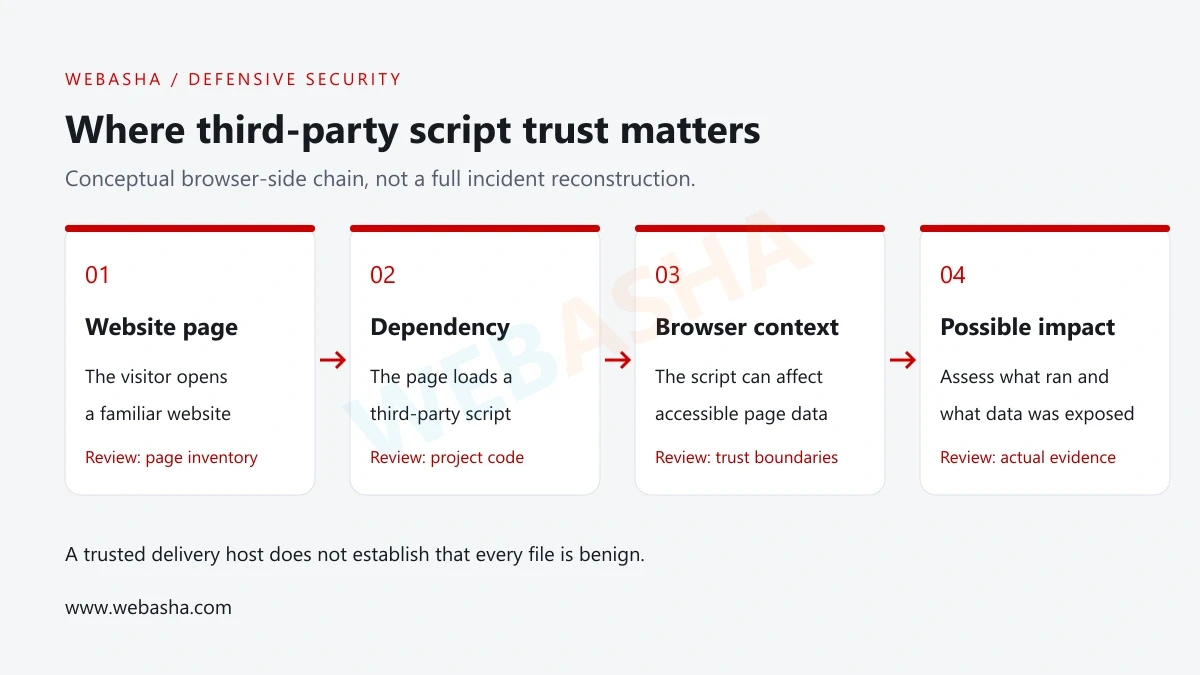
For the wider dependency problem, see WebAsha’s supply-chain security guide.
What visitor information was at risk?
The reported malware could skim payment-card details, replace cryptocurrency payment addresses with attacker-controlled alternatives, and collect browser cookies and page screenshots. Report URI also identified delivery of the Coruna and DarkSword iOS exploit kits to iPhones and iPads and reported verified cryptocurrency transfers to the attackers. These findings establish reported theft in the campaign, while individual visitor impact still requires evidence. [1]
| Activity or data | Why it needs review | Important boundary |
|---|---|---|
| Copying a payment destination | Check the intended destination against the completed transaction. | A syntactically valid address can still be the wrong recipient. |
| Entering payment details | Establish which form and page were used. | Do not assume all payment integrations expose the same fields. |
| Using an authenticated page | Review relevant session activity and accessible page data. | Cookie flags and application design affect what a script can read. |
| Browsing from a mobile device | Check device updates and any organisation-issued guidance. | An attempted exploit is not proof of successful device compromise. |
StepSecurity says the analysed skimmer could not read card fields inside a cross-origin payment iframe. That limit does not make the surrounding page harmless: it can still display misleading content or affect other accessible data. [3]
MDN explains that the same-origin policy restricts interactions across origins. It is a specific browser boundary, not a general assurance about every script and element within the surrounding page. [7]
What should visitors do now?
Start with the site’s own incident notice and your activity during the relevant period. Keep the page name, approximate visit time and any transaction reference. Avoid returning to a questionable page simply to recreate the event.
- Update your browser and operating system through their normal settings or official support channels.
- If you entered payment information, ask your issuer what action is appropriate for your situation. Use its official app or the number printed on the card.
- Review account activity and sign out other sessions where the service provides that control. Follow the provider’s specific account-recovery instructions.
- Check any completed cryptocurrency transfer against the destination you intended to use, using an independent trusted record.
- Be cautious about follow-up messages offering refunds or recovery. Never share a recovery phrase, password or one-time code with a supposed support agent.
On iPhone or iPad, Apple directs users to Settings → General → Software Update. Back up the device and follow the update instructions applicable to that model. [8]
For an unauthorised card transaction, the FTC recommends contacting the issuer promptly through a trusted channel. The available remedies depend on your provider and jurisdiction; this article does not determine liability or guarantee recovery. [10]
A response checklist for website and security teams
Use the provider’s notification to identify the projects and environments that need review. Assign an incident owner and record decisions. The following is an operational checklist to adapt to your environment; it does not replace a forensic investigation.
| Work item | Record | Acceptance question |
|---|---|---|
| Scope the dependency | Project IDs, page locations, tag owners and deployment routes | Which pages could have loaded the affected project? |
| Preserve evidence | Saved source, headers, capture time, timezone and hashes | Can another responder identify the exact captured version? |
| Contain the exposure | Approved disable/removal action and application checks | Have the affected paths stopped delivering the unwanted code? |
| Review access | Provider users, integrations, tokens and change history | Was unauthorised access removed as well as the injected content? |
| Assess visitors | Relevant time window, forms, sessions and available telemetry | Which impact claims have evidence, and which remain unknown? |
| Recover and communicate | Retested pages, monitoring results and scoped notices | Can the team explain the remaining uncertainty? |
NIST SP 800-61 Rev. 3 places incident response within cybersecurity risk management, including preparation, detection, response and recovery. Use that broader approach to connect the website fix with access review and follow-up monitoring. [9]
For a walkthrough of investigation records, read WebAsha’s incident response and digital forensics guide.
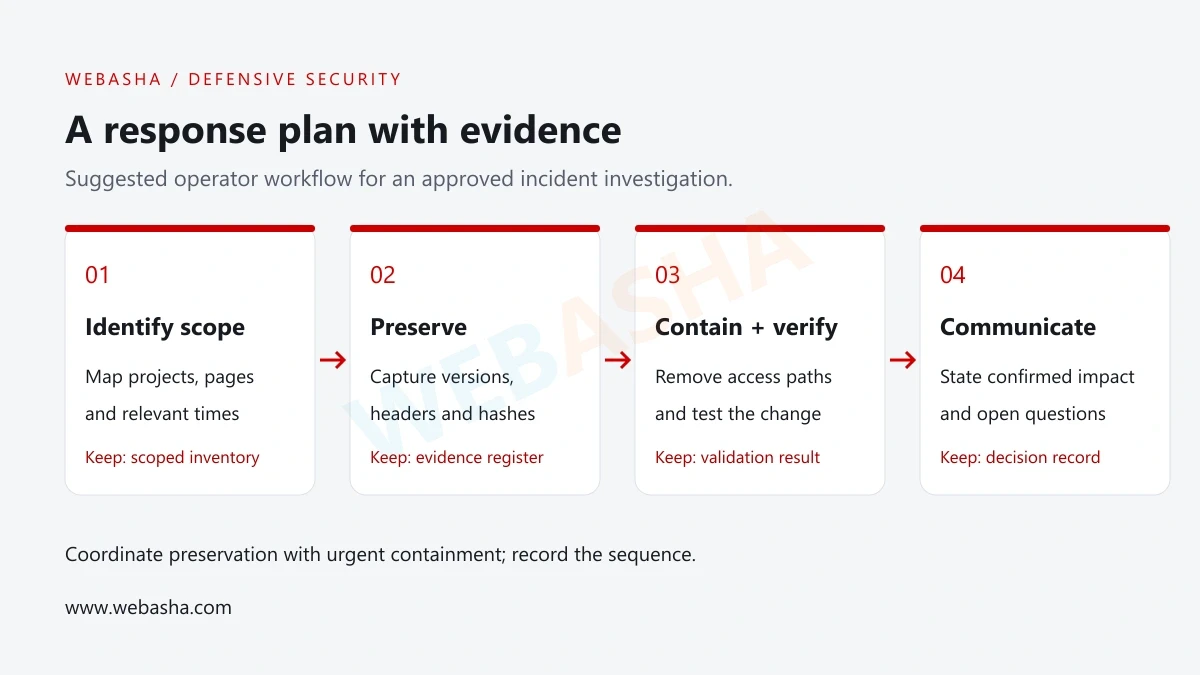
Start with a passive review of approved evidence
Ask the response team for saved script samples and an approved page capture. Record where each sample came from before comparing it with a known approved version. Do not browse attacker infrastructure or execute a suspicious script as a test.
For a local sample on a Linux analysis workstation, the following commands read the file and report its hash and size. They do not establish whether it is safe:
sha256sum saved-snippet.js
wc -c saved-snippet.js
Prerequisite: replace the filename with the captured sample supplied by your incident team. Expected result: a SHA-256 digest and a byte count. Compare the actual output with your evidence register, not with an invented universal “clean” hash.
Keep the collection time, project ID, response headers and reviewer alongside the result. Request historical deployment or provider records if your saved sample was collected after remediation. No scripts, payloads or live targets were tested for this article.
What CSP, SRI and cookie settings can actually do
Content Security Policy
Content Security Policy (CSP) controls resource loading and other browser behaviour. MDN recommends testing proposed policies in report-only mode before enforcing them. Report-only generates observations; it does not block the reported violation. [4]
Review both script-loading and outbound-connection restrictions. A policy that permits a provider’s host can still permit an altered resource from that host. Carefully assess delegated script trust, including strict-dynamic, rather than assuming any nonce-based policy blocks a compromised trusted loader. [4]
Subresource Integrity
Subresource Integrity (SRI) checks a downloaded resource against an expected cryptographic hash. It is useful when you can approve stable file contents. A frequently changing experimentation snippet requires a controlled update process so legitimate releases do not break the integrity check. [5]
HttpOnly cookies and payment isolation
HttpOnly prevents JavaScript from directly reading the cookie through document.cookie. The cookie may still accompany relevant requests, so this flag does not stop every action a malicious script could perform in an authenticated page. [6]
Use a control review to state exactly which behaviour each mechanism limits. Then test that behaviour in an approved environment. For more background, see the incident-response preparation guide.
What remains uncertain in a developing incident?
A public list of organisations is not a complete visitor-impact assessment. Ask for the affected project and page, the time period and the evidence supporting the conclusion. Avoid treating a brand’s entire product range as affected because one web property appears in a report.
Similarly, cleanup and investigation milestones have different meanings. Removing unwanted code, invalidating access and determining historical exposure answer different questions. Do not describe all three as complete unless the relevant provider or incident owner has confirmed them.
Build defensive investigation skills with WebAsha
Explore the Cyber Security Course at WebAsha Technologies to practise log analysis, browser-security concepts and incident reporting. Contact WebAsha to discuss your starting level and training goals.
References and official guidance
- Report URI: original incident investigation
- Optimizely: Web Experimentation Security Incident notice
- StepSecurity: OPTIMJACK technical analysis, updated 17 November
- MDN: Content Security Policy implementation
- MDN: Subresource Integrity
- MDN: Same-origin policy
- Apple: Update your iPhone or iPad
- NIST SP 800-61 Rev. 3: Incident response recommendations
- FTC: What to do if you were scammed
Frequently Asked Questions
What's Your Reaction?
 Like
0
 Dislike
0
 Love
0
 Funny
0
 Wow
0
 Sad
0
 Angry
0

With a passion for staying on the cutting edge of technology trends, I am dedicated to delivering content that not only informs but also inspires. Whether you need in-depth analysis pieces, informative guides, or thought-provoking opinion pieces, I craft content that resonates with tech enthusiasts and professionals alike.