What Is a Sandbox in Cybersecurity? Types, Evasion and a Safe Setup
A sandbox is an isolated environment where untrusted code can run without being able to harm the real system or network. Security teams use sandboxes to detonate suspicious files and watch what they do, browsers and operating systems use them to contain what a web page or app can touch, and developers use them for safe testing.
Topic: Cybersecurity Foundations in Cybersecurity & Ethical Hacking · Explainer
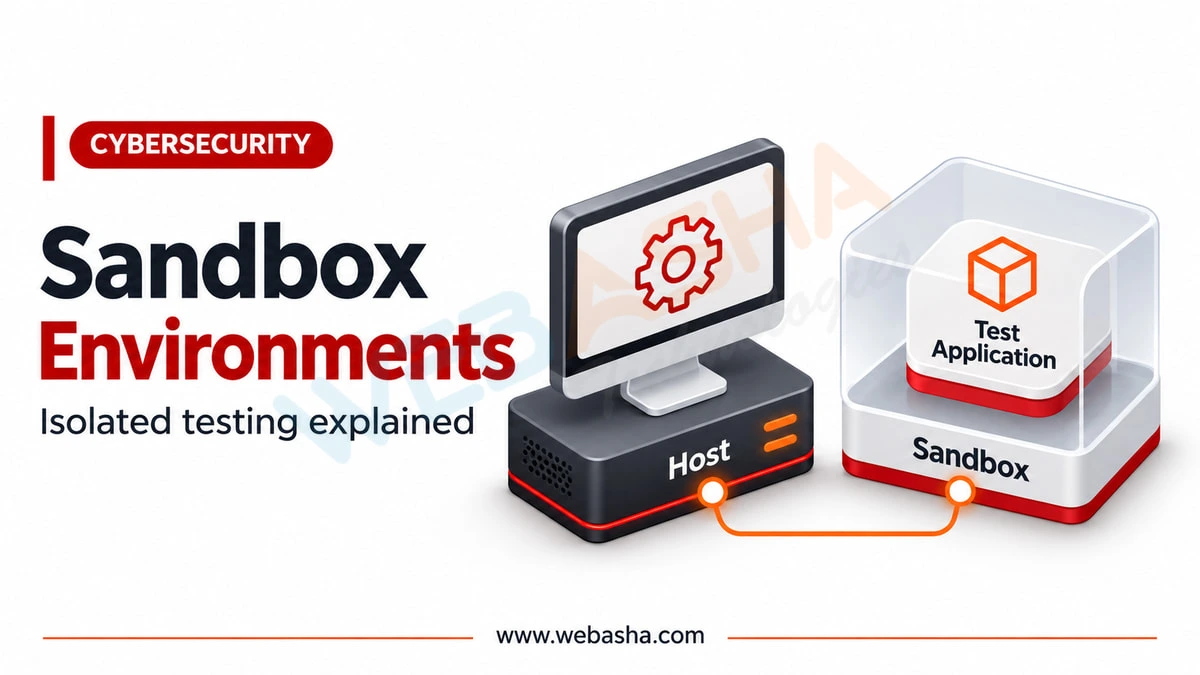
Quick answer: A sandbox is an isolated environment where untrusted code can run without being able to harm the real system or network. Security teams use sandboxes to detonate suspicious files and watch what they do, browsers and operating systems use them to contain what a web page or app can touch, and developers use them for safe testing. Their weakness is that well-written malware checks whether it is in a sandbox and behaves innocently when it is.
Key takeaways
- A sandbox limits what code can reach. The quality of the isolation decides how safe it is.
- Malware analysis sandboxes record behaviour: files written, processes started, network calls made.
- Evasive malware detects sandboxes through timing, hardware fingerprints and missing user activity. MITRE ATT&CK tracks this as technique T1497.
- A clean result from a sandbox is not proof a file is safe.
- Windows Sandbox gives anyone on Windows Pro or Enterprise a disposable test machine in minutes.
Table of Contents
- What Is a Sandbox in Cybersecurity?
- What Are the Main Types of Sandbox?
- How Does Sandbox Malware Analysis Work?
- How Do You Set Up Windows Sandbox Safely?
- What Is Sandbox Evasion?
- How Do Analysts Counter Evasion?
- What Are the Practical Limitations?
- How Can Learners Build an Analysis Lab?
- References
What Is a Sandbox in Cybersecurity?
A sandbox is a controlled space with walls. Code inside can run, but its access to files, memory, the network and other processes is restricted or faked. When the session ends, the sandbox is thrown away and anything the code changed goes with it.
The idea appears at several scales: a browser tab isolated from the rest of the system, an app on a phone limited to its own storage, a virtual machine for detonating malware, or a cloud service that opens email attachments before users do.
What Are the Main Types of Sandbox?
| Type | Isolation | Typical use |
|---|---|---|
| Full virtual machine | Strong, separate operating system | Malware analysis, risky testing |
| Emulator | Simulated CPU and system | Analysing code for other architectures |
| Container | Shares the host kernel | Application isolation; weaker for hostile code |
| Application or browser sandbox | Process-level restrictions | Containing what a web page or app can do |
| Cloud detonation service | Provider-run VMs | Scanning email attachments and downloads at scale |
For hostile code, prefer a full virtual machine. Containers share the host kernel, so a kernel vulnerability can be an escape route.
How Does Sandbox Malware Analysis Work?
A file is placed into an instrumented virtual machine and run. Monitoring records what follows: new processes, files dropped, registry keys changed, DLLs loaded, DNS lookups and network connections, often with memory dumps and screenshots. Automated platforms such as CAPE turn that into a report and extract indicators of compromise such as domains, IP addresses and file hashes.
The output is behaviour, not a verdict. An analyst still reads it and decides what it means.
How Do You Set Up Windows Sandbox Safely?
Windows Sandbox is a lightweight, disposable virtual machine included in Windows Pro and Enterprise. Everything inside is discarded when it closes. Enable it once:
# PowerShell as Administrator, then reboot
Enable-WindowsOptionalFeature -Online -FeatureName 'Containers-DisposableClientVM' -All
Then control it with a .wsb configuration file. This one turns off networking and the clipboard, and maps one folder read-only so the sample cannot write back to your real disk:
<Configuration>
  <Networking>Disable</Networking>
  <ClipboardRedirection>Disable</ClipboardRedirection>
  <MappedFolders>
    <MappedFolder>
      <HostFolder>C:\Samples\incoming</HostFolder>
      <ReadOnly>true</ReadOnly>
    </MappedFolder>
  </MappedFolders>
</Configuration>
Double-click the file to start it. Record the sample's hash before you open anything, so you can match it to threat intelligence and to anything you see later:
Get-FileHash C:\Samples\incoming\invoice.exe -Algorithm SHA256Windows Sandbox is good for opening a doubtful document or installer safely. It is not built for serious malware analysis: it has little monitoring, and because it runs on your own machine, a sandbox escape would land on your real system. For that work, use a dedicated analysis VM on a separate host or network.
What Is Sandbox Evasion?
Malware authors know their code will be detonated in sandboxes, so they check first. MITRE ATT&CK T1497 groups these as virtualisation and sandbox evasion, with sub-techniques for system checks, user activity checks and time-based evasion.
| Check | What the malware looks for |
|---|---|
| System checks | VM drivers, MAC address prefixes, small disk or RAM, few CPU cores |
| User activity | No mouse movement, no recent documents, a fresh browser history |
| Time-based | Sleeping longer than the analysis window, or checking whether sleeps were skipped |
| Environment | Analysis tools running, debugger present, unusual usernames |
If any check fires, the sample does nothing interesting, and the sandbox reports a harmless file.
How Do Analysts Counter Evasion?
- Make the VM look used: realistic hardware sizes, documents, browser history, a normal username.
- Hide or rename analysis tools, and remove obvious virtualisation artefacts where possible.
- Run longer, and simulate user input such as mouse movement and clicks.
- Combine dynamic analysis with static analysis of the file itself, which does not depend on the malware cooperating.
- Treat a quiet sample with suspicion if other signals, such as its origin or packing, look bad.
What Are the Practical Limitations?
- Coverage gaps: a sample may need a specific OS version, language setting, or a command from a server that is no longer online.
- Network dilemma: allowing internet access shows real behaviour but can alert the attacker or let the sample cause harm; blocking it may hide behaviour.
- False confidence: a clean report means nothing happened in that run, not that the file is safe.
- Escape risk: rare but real, which is why serious analysis uses isolated hardware.
How Can Learners Build an Analysis Lab?
- Use a dedicated machine or at least a separate hypervisor network with no route to your home or office network.
- Create a Windows analysis VM and take a clean snapshot before any sample touches it.
- Add monitoring: Sysmon, Process Monitor and a packet capture.
- Route its traffic to a simulated internet service instead of the real one, at least at first.
- Detonate, record, revert to the snapshot. Every time.
- Practise on samples from reputable research sources, and never on systems you do not own.
Our dynamic malware analysis checklist covers the lab in detail, and our guide to free malware analysis tools lists what to install.
Talk to a WebAsha training advisor about malware analysis training, batches and current fees.
References
- MITRE ATT&CK T1497, Virtualization/Sandbox Evasion
- Microsoft Learn, Windows Sandbox
- CAPE Sandbox documentation
Related reading
Frequently Asked Questions
What's Your Reaction?
 Like
0
 Dislike
0
 Love
0
 Funny
0
 Wow
0
 Sad
0
 Angry
0

I am passionate about technology, invention and big challenging tasks on my to- do list. In terms of the work I am doing also at Bunnyshell, I am most passionate about the technologies that we are using., I'm devoted to delivering content that not only informs but also inspires. Whether you need in- depth analysis pieces, educational attendants, or study- provoking opinion pieces, I draft content that resonates with tech suckers and professionals likewise.