What Is Mobile Device Management (MDM)? Features, BYOD and Privacy
Mobile Device Management (MDM) is software that lets an organisation enrol, configure, secure and if necessary wipe the phones, tablets and laptops its people use for work. Through it, IT can enforce a passcode and encryption, install and update apps, push Wi-Fi and email settings, keep devices patched and remove company data when a device is lost or someone leaves.
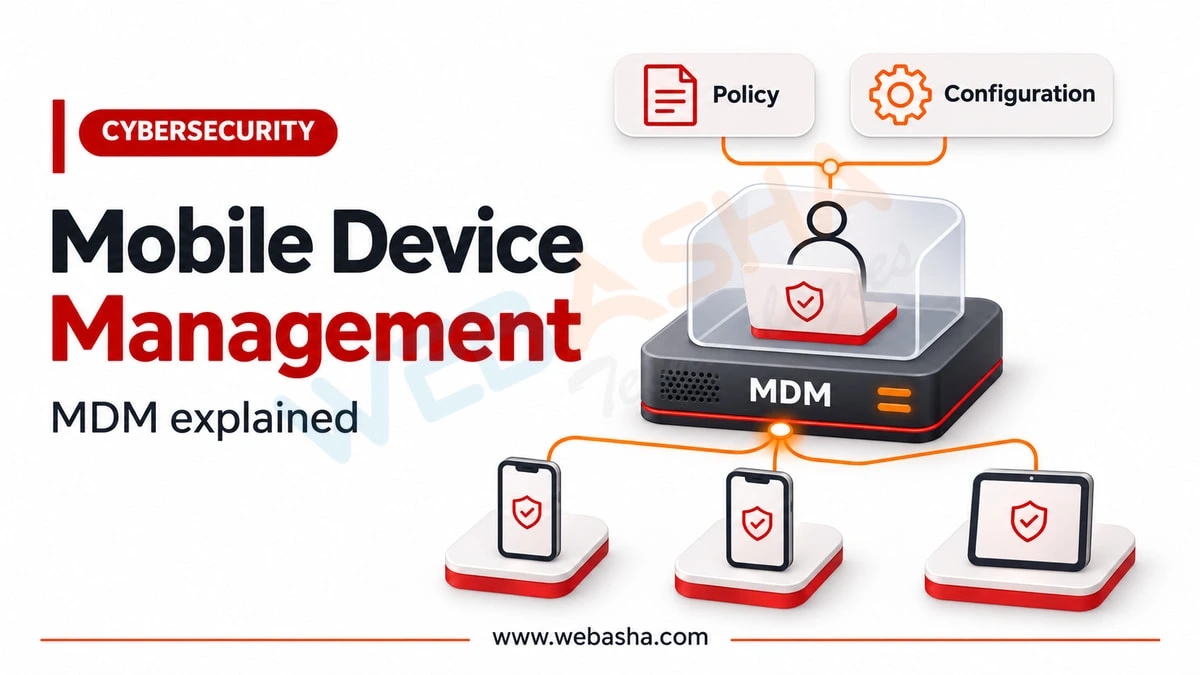
Quick answer: Mobile Device Management (MDM) is software that lets an organisation enrol, configure, secure and if necessary wipe the phones, tablets and laptops its people use for work. Through it, IT can enforce a passcode and encryption, install and update apps, push Wi-Fi and email settings, keep devices patched and remove company data when a device is lost or someone leaves. On personal devices, modern platforms separate work data from personal data, so the organisation manages the work side without seeing personal photos, messages or browsing.
Key takeaways
- MDM manages the whole device; MAM manages only specific apps and their data.
- Unified endpoint management (UEM) extends the same control to laptops and desktops.
- For personal devices, Android work profiles and Apple's user enrolment keep work and personal data apart.
- Company-owned devices can be enrolled automatically before the user even unboxes them.
- MDM is a foundation, not a complete defence. It works best with identity controls and threat detection.
Table of Contents
- What Is Mobile Device Management?
- What Can MDM Actually Do?
- What Is the Difference Between MDM, MAM and UEM?
- How Does Enrolment Work?
- How Do You Check Whether a Device Is Managed?
- How Does MDM Handle BYOD?
- What Are the Privacy Boundaries?
- How Is MDM Deployed Successfully?
- How Does MDM Fit Into Wider Security?
- How Do You Choose an MDM Solution?
- References
What Is Mobile Device Management?
Phones carry email, files, chat and access to business systems, and they are easily lost. MDM gives an organisation a central console to manage those devices according to policy. NIST SP 800-124 Rev. 2, published in May 2023, sets out how enterprises should approach the security of mobile devices, from threat analysis through to deployment and operation, and treats central management as a core capability.
MDM works through management frameworks built into the operating systems themselves: Apple's for iPhone, iPad and Mac, Android Enterprise for Android, and Windows' built-in management for Windows. Products such as Microsoft Intune, Jamf, VMware Workspace ONE, Google endpoint management and many others sit on top of those frameworks.
What Can MDM Actually Do?
- Enforce security settings: passcode rules, encryption, screen lock timeout, blocking of features such as USB debugging.
- Configure the device: Wi-Fi, VPN, email accounts and certificates, so users do not set them up by hand.
- Manage apps: install required apps, block others, push updates, and configure work apps.
- Keep devices current: require minimum operating system versions and schedule updates.
- Report compliance: show which devices meet policy and which do not.
- Respond to loss: lock, locate where allowed, and wipe either the whole device or only work data.
What Is the Difference Between MDM, MAM and UEM?
| MDM | MAM | UEM | |
|---|---|---|---|
| Manages | The whole device | Specific apps and their data | Phones, tablets and computers together |
| Needs device enrolment | Yes | No | Yes, for full control |
| Can wipe | The device or the work area | Only app data | The device or the work area |
| Best for | Company-owned devices | Personal devices, contractors | Organisations managing every endpoint in one place |
| Example control | Require encryption on the device | Block copy-paste from work email into personal apps | One compliance policy for phones and laptops |
How Does Enrolment Work?
For company-owned devices, automated enrolment is the strongest option. Devices bought through approved channels are registered to the organisation, so when the user switches one on and connects to the internet, it enrols itself and receives its configuration. Apple calls this Automated Device Enrollment, documented in the Apple Platform Deployment guide, and Android offers zero-touch enrolment through Android Enterprise. Users cannot easily remove the management.
For personal devices, enrolment is user-initiated, usually by signing in to a company app, and creates a separate work area instead of managing the whole phone.
How Do You Check Whether a Device Is Managed?
Support teams and auditors ask this constantly. Each platform answers it locally.
macOS: shows whether the Mac is enrolled in MDM and whether the enrolment came from automated enrolment.
sudo profiles status -type enrollment
profiles listWindows: shows whether the device is joined to Microsoft Entra ID and enrolled in device management, as used with Microsoft Intune.
dsregcmd /statusAndroid: from a computer with developer tools and USB debugging enabled on a test device, lists any device owner or profile owner app, which is how Android Enterprise management appears.
adb shell dpm list-ownersOn iPhone and iPad, the same information is under Settings, General, VPN and Device Management.
How Does MDM Handle BYOD?
Bring your own device is where MDM has changed most. Fully managing a personal phone gives the employer more control than most people will accept. The current approach separates the two:
- Android work profile: work apps live in a separate profile, marked with a badge, which the organisation manages. Personal apps and data are outside its reach.
- Apple user enrolment: a managed work identity and storage area on a personal iPhone or iPad, with deliberately limited management powers.
- App protection without enrolment: MAM policies on apps such as Outlook and Teams protect work data even if the device is not enrolled at all.
What Are the Privacy Boundaries?
| On a personal device with a work profile or user enrolment, the organisation can | The organisation cannot |
|---|---|
| See and manage work apps and work data | See personal apps, photos, messages or browsing |
| Require a passcode and a minimum OS version | Read personal email or texts |
| Wipe the work profile or managed data | Wipe personal data with a work-only wipe |
| See device model and OS version | Track location in normal operation |
Exact capabilities vary by platform and product, so publish a plain-language statement of what you collect. In India, the Digital Personal Data Protection regime phasing in from November 2025 makes that transparency about employee data more important, not less.
How Is MDM Deployed Successfully?
- Decide ownership models first: company-owned, personal, or both, and what each may access.
- Write the policies in plain language before configuring anything.
- Pilot with a small group including non-technical users, and fix the friction they hit.
- Use automated enrolment for every new company-owned device.
- Tie access to compliance: devices that fall out of policy lose access to company data until fixed.
- Plan the leaver process, so work data is removed the day access ends.
How Does MDM Fit Into Wider Security?
MDM ensures devices are configured and patched, but it does not stop a user typing a password into a phishing page or detect malware by itself. It works best combined with conditional access, which grants access to company apps only from compliant devices, with phishing-resistant multi-factor authentication, and with mobile threat defence. For the attack side of mobile security, see our mobile app pentesting guide, and for authentication, mobile authentication strategies.
How Do You Choose an MDM Solution?
- Which platforms do you need: Android, iPhone, Mac, Windows, all of them?
- Does it support automated enrolment and work profiles or user enrolment for BYOD?
- Does it integrate with your identity provider for conditional access?
- Can reports show compliance for audits?
- Where is device data stored, and for how long?
Talk to a WebAsha training advisor about endpoint and mobile security courses, batches and current fees.
References
- NIST SP 800-124 Rev. 2, Guidelines for Managing the Security of Mobile Devices in the Enterprise, May 2023
- Apple Platform Deployment guide
- Android Enterprise developer documentation
- Microsoft Intune documentation
Related reading
Frequently Asked Questions
What's Your Reaction?
 Like
0
 Dislike
0
 Love
0
 Funny
0
 Wow
0
 Sad
0
 Angry
0

Vaishnavi is a skilled tech professional at the Ethical Hacking Training Institute in Pune, responsible for managing and optimizing the technical infrastructure that supports advanced cybersecurity education. With deep expertise in network security, backend operations, and system performance, she ensures that practical labs, online modules, and assessments run smoothly and securely. Her behind-the-scenes contributions play a vital role in delivering a seamless and secure learning experience for aspiring ethical hackers.